
Защо прокси потребителите и екипите за автоматизация добавят CaptchaAI към техния стек за автоматизация

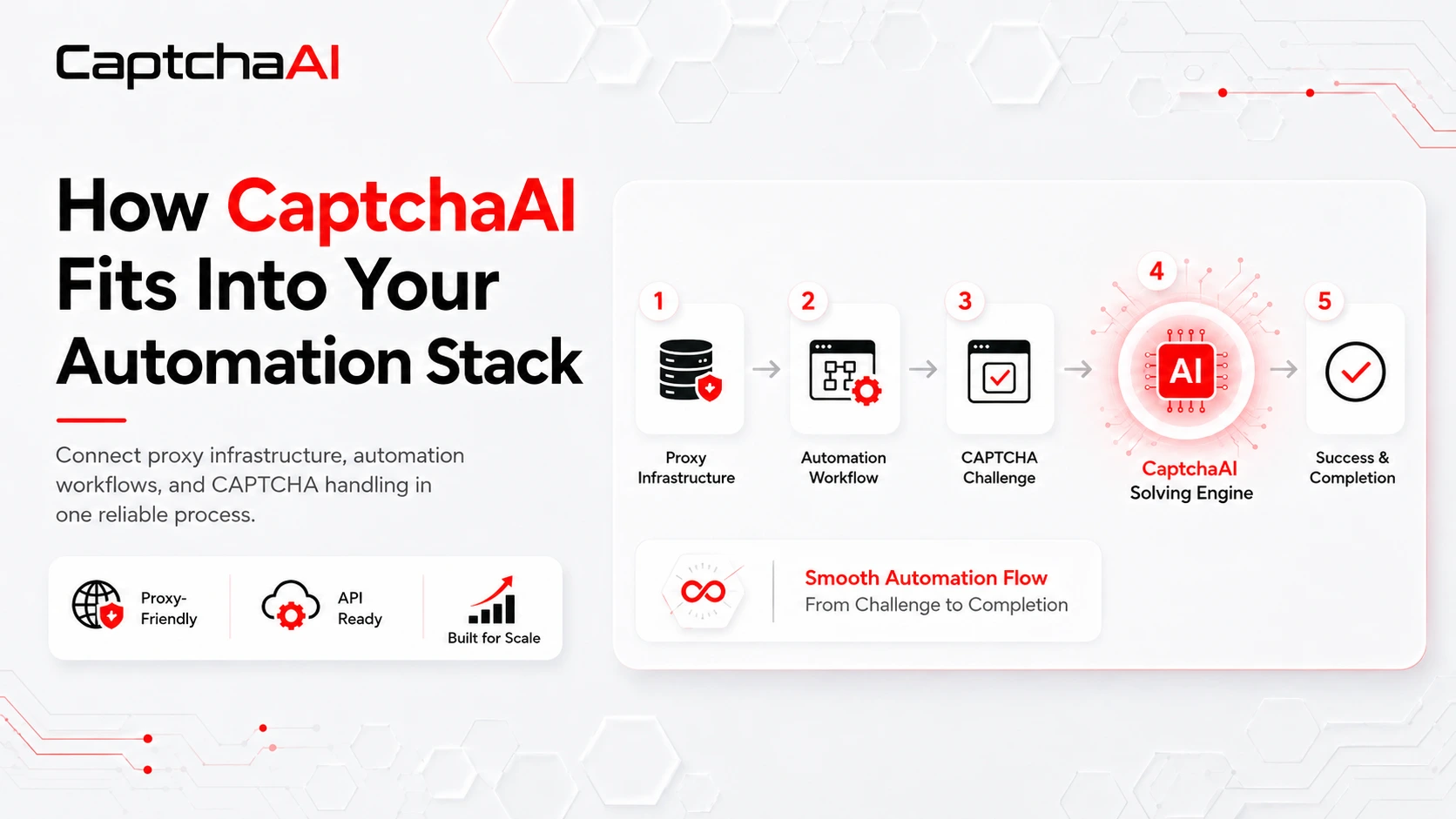
A reliable proxy network can solve many of the connectivity challenges involved in browser automation, website testing, data collection, and location-specific workflows.
It can provide the required IP type, route traffic through a selected location, and help teams maintain stable sessions across different network environments.
But even a high-quality proxy cannot complete a CAPTCHA challenge.
When a CAPTCHA appears, the proxy connection may still be working correctly, but the automation task cannot continue until the verification step is completed. This is why proxy users often add a separate CAPTCHA-solving service to their automation stack.
CaptchaAI is designed to provide that missing layer.
It works alongside residential, mobile, ISP, and datacenter proxies to process supported CAPTCHA challenges inside authorized automation workflows. With plans starting at just $15 per month and unlimited CAPTCHA solving included across every plan, CaptchaAI offers a practical alternative to services that charge separately for every completed task.
Proxies and CAPTCHA Solving Address Different Problems
A complete automation stack normally contains several components, each with a separate responsibility.
The proxy provider manages network routing, IP selection, location coverage, and connection quality. The automation platform controls scripts, browsers, cookies, sessions, task queues, and workflow logic.
CaptchaAI handles the CAPTCHA challenges that interrupt those workflows.
These layers complement one another, but they are not interchangeable.
A new proxy may resolve a failed connection or location mismatch, but it cannot independently generate a reCAPTCHA token, recognize a distorted image, complete a grid challenge, or return the data required by a Cloudflare verification page.
Similarly, an automation tool can detect that a CAPTCHA has appeared, but it still needs a dedicated solving component before the task can continue.
CaptchaAI allows teams to add that capability without replacing their existing proxy provider or rebuilding the rest of their automation infrastructure.
Why CAPTCHA Interruptions Matter at Scale
Manually completing one CAPTCHA may take only a few seconds. The problem becomes much larger when an automation platform is processing hundreds or thousands of tasks.
Even occasional CAPTCHA interruptions can create:
- Incomplete tasks and datasets
- Stopped browser sessions
- Repeated request attempts
- Growing manual-review queues
- Delayed monitoring or testing schedules
- Additional engineering work
- Less predictable operating costs
Without a dedicated solving process, teams may treat every CAPTCHA as an unexpected failure.
With CaptchaAI integrated into the workflow, supported challenges can follow a defined process. The automation system detects the challenge, submits the required information, receives the result, applies it to the original session, and validates whether the target website accepted it.
This does not remove the need for proper monitoring, retry controls, or session management. It gives teams a consistent way to handle CAPTCHA interruptions instead of immediately stopping the task.
Unlimited CAPTCHA Solving From $15 Per Month
CaptchaAI’s pricing model is one of its strongest advantages for regular automation users.
Many CAPTCHA-solving providers use per-solve pricing. Under that model, the cost increases each time another CAPTCHA is processed.
CaptchaAI uses a thread-based subscription model instead.
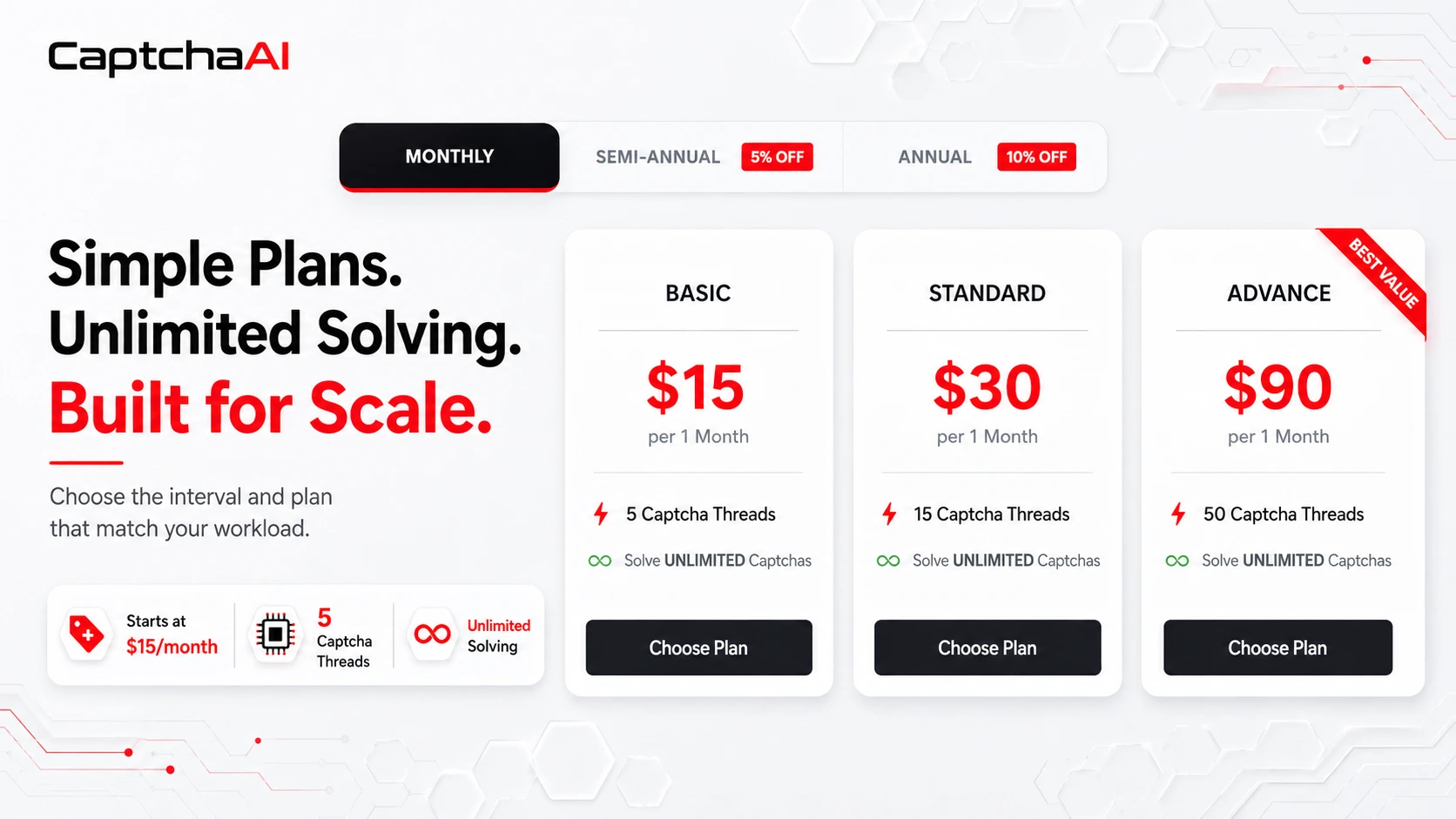
The Basic plan currently starts at $15 per month and includes five concurrent CAPTCHA threads. Every CaptchaAI plan includes unlimited solving within its available thread capacity.
There is no separate charge for every CAPTCHA submitted.
A thread represents one CAPTCHA task being processed at that moment. When the task finishes, the thread becomes available for the next request.
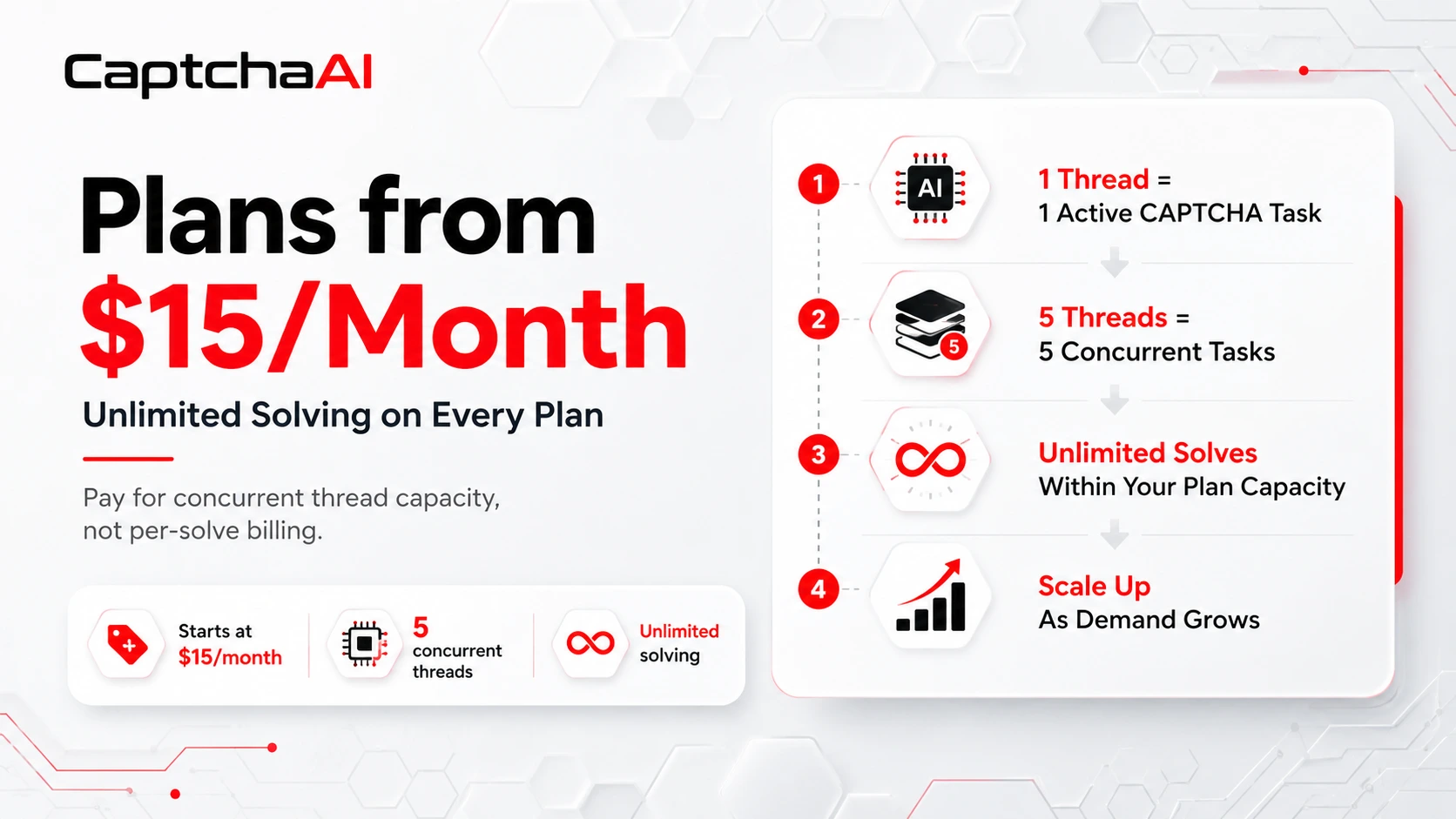
For example, a five-thread plan can process up to five CAPTCHA tasks at the same time. It can continue processing new tasks throughout the month as threads become available.
This distinction is important:
Unlimited solving means unlimited CAPTCHA submissions within the selected concurrent thread capacity. It does not mean unlimited simultaneous tasks.
For steady or high-volume workloads, this model can make monthly costs easier to predict. Instead of estimating a bill based on every individual solve, teams select a plan according to their expected peak concurrency.
A workflow that encounters CAPTCHAs gradually may operate with a smaller number of threads. A system that regularly receives many challenges at the same time will require more concurrent capacity.
CaptchaAI also allows users to add another active plan when more threads are needed, making it possible to scale capacity as the workload grows.
A Strong Match for Proxy-Based Automation
Proxy quality remains an important part of CAPTCHA-related workflows.
A stable proxy can help preserve the network conditions required by the target website. Poor-quality, overloaded, or frequently changing proxies may cause connection failures even when the CAPTCHA solver is functioning correctly.
In some workflows, the CAPTCHA result must be applied using the same IP address, browser session, cookies, or User-Agent used when the challenge first appeared.
This makes session consistency especially important.
A returned result may still be rejected when:
- The proxy IP changes during the task
- The browser session expires
- Cookies are applied to the wrong session
- The User-Agent changes
- Incorrect challenge parameters are submitted
- The original page context is no longer active
CaptchaAI and proxy infrastructure therefore work best as coordinated layers.
The proxy maintains the required network route. The automation software maintains the browser state and workflow logic. CaptchaAI processes the supported CAPTCHA challenge.
Teams should not automatically attach a proxy to every solving request. When the target website does not require IP matching, adding an unnecessary proxy may introduce more latency or another potential failure point.
When IP consistency is required, teams should use a stable proxy and maintain the same session conditions from challenge detection through final validation.
Multiple CAPTCHA Types Through One Service
Automation teams may encounter different verification technologies across their projects.
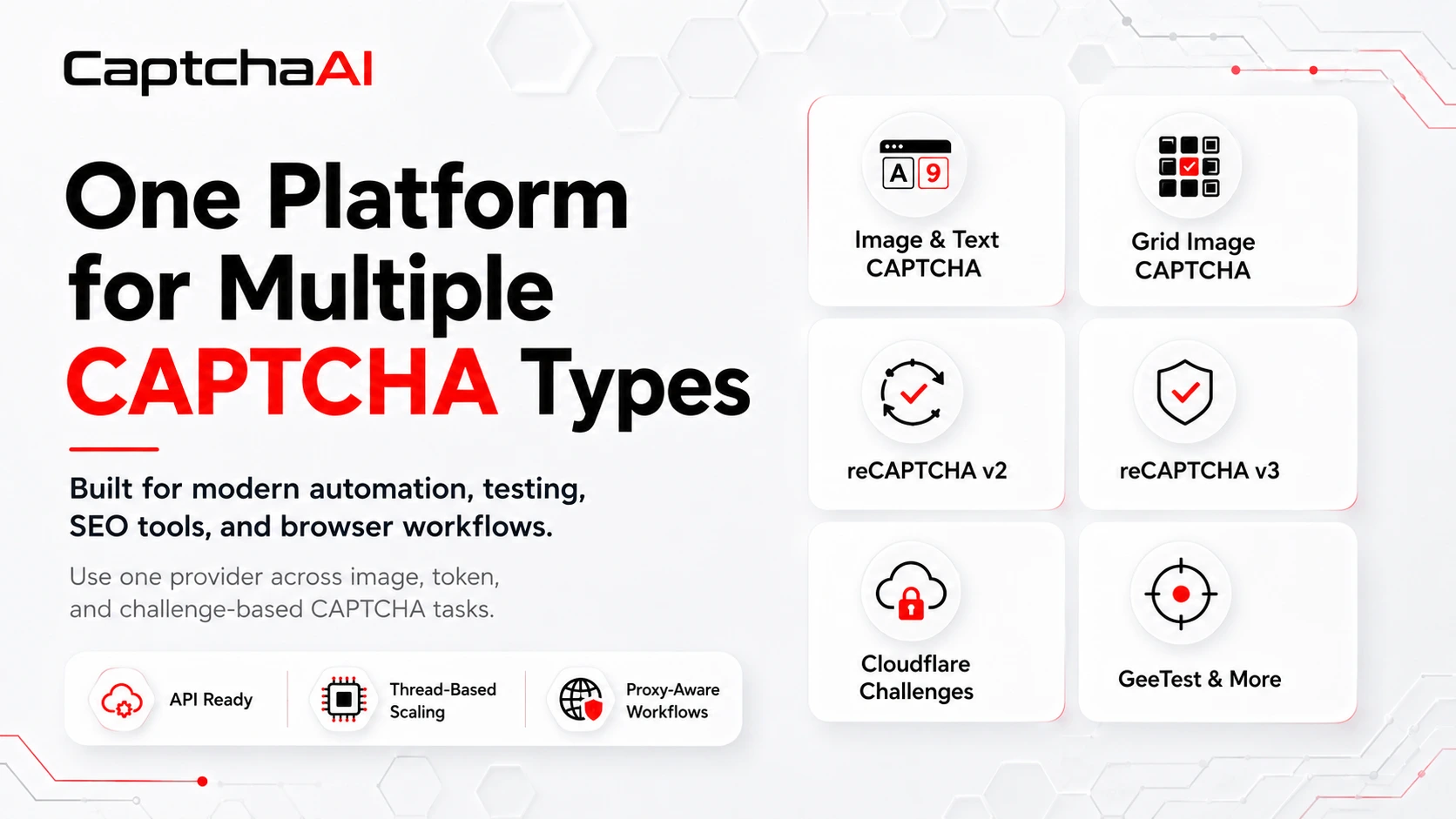
CaptchaAI currently documents support for several major CAPTCHA families, including:
- Normal text and image CAPTCHAs
- Grid Image CAPTCHA
- reCAPTCHA v2
- Invisible reCAPTCHA v2
- Callback-based reCAPTCHA v2
- reCAPTCHA v2 Enterprise
- reCAPTCHA v3
- reCAPTCHA v3 Enterprise
- Cloudflare Turnstile
- Cloudflare Challenge
- GeeTest v3
- BLS CAPTCHA
- CaptchaFox
- Friendly Captcha
- Lemin CAPTCHA
CaptchaAI also advertises support for more than 27,500 image CAPTCHA formats.
Using one platform for multiple challenge types can reduce the need to maintain a separate provider or custom integration for every website.
However, teams should always identify the exact CAPTCHA type before production deployment. They should also test the required challenge with their real proxy, session, and target environment rather than assuming that every implementation behaves identically.
Flexible Integration Without Rebuilding the Stack
Different automation teams use different tools, which is why CaptchaAI provides more than one integration path.
Developers can connect through the CaptchaAI API from an HTTP-capable programming environment. CaptchaAI can also be available as a direct provider inside selected automation applications.
For software that already supports compatible CAPTCHA providers, CaptchaAI offers configuration options and a Windows Emulator. A browser extension is also available for supported browser-based workflows.
This flexibility allows teams to select the method that best matches their existing setup.
A custom development team may prefer direct integration and full control over queueing, validation, and logging. A user working with established automation software may prefer a compatible provider option or the emulator.
The goal is not to rebuild the automation stack. It is to add CAPTCHA handling in the most practical way for the current environment.
What a Reliable Integration Should Include
Adding a CAPTCHA solver is only one part of a dependable implementation.
Production workflows should also include:
- CAPTCHA detection
- Controlled task queues
- Limited retries
- Session validation
- Proxy health monitoring
- Error logging
- End-to-end acceptance checks
The last point is particularly important.
Receiving a result from a CAPTCHA service does not always mean the target website accepted it. A result may be rejected because the session expired, the proxy changed, the wrong site information was used, or the browser context no longer matches.
Teams should therefore measure successful task completion, not only the number of CAPTCHA results returned.
Useful monitoring data may include the challenge type, processing time, proxy identifier, retry count, returned error, and final acceptance status.
This information helps teams distinguish between a CAPTCHA-solving issue, an unstable proxy, an expired browser session, and an incorrect integration parameter.
Who Can Use CaptchaAI?
CaptchaAI can complement proxy infrastructure in authorized use cases such as:
- Web application and quality-assurance testing
- Browser automation
- Permitted data collection
- SEO monitoring platforms
- Internal business-process automation
- Customer-authorized data projects
- Location-specific website testing
- SaaS platforms that encounter CAPTCHA interruptions
This type of workflow should only be used in owned, client-authorized, or contractually permitted environments.
Users remain responsible for complying with applicable laws, privacy requirements, contractual permissions, and the terms of the websites they access.
Try CaptchaAI With Your Existing Proxies
The best way to evaluate CaptchaAI is to test it with the same proxies, sessions, CAPTCHA types, and task volume used in the real workflow.
CaptchaAI currently offers a three-day trial with five concurrent threads, allowing teams to evaluate integration compatibility and estimate the capacity they need before choosing a paid subscription.
During the test, teams should measure:
- Which CAPTCHA types appear
- How often challenges interrupt tasks
- Peak simultaneous demand
- Session and proxy consistency
- End-to-end acceptance rates
- The number of threads required during busy periods
This provides a more accurate basis for selecting a plan than relying only on total monthly task volume.
Add Affordable CAPTCHA Handling to Your Automation Stack
High-quality proxies provide the network foundation that automation workflows need. CaptchaAI adds the specialized layer required when supported CAPTCHA challenges interrupt those workflows.
With subscriptions starting at $15 per month, unlimited CAPTCHA solving on every plan, scalable thread capacity, multiple integration options, and support for several major CAPTCHA types, CaptchaAI gives proxy users a predictable way to add CAPTCHA handling without paying separately for every solve.
Join the CaptchaAI Community
Get product updates, integration discussions, support information, practical tips, and selected community offers.
Join the CaptchaAI Discord Community
Proxy infrastructure manages the connection. Automation software manages the workflow. CaptchaAI handles the supported CAPTCHA challenges that appear between them.