
프록시 프로토콜이란 무엇이며 어떻게 다릅니까?
프록시 프로토콜이란 무엇이며, 어떻게 다른가요?
프록시는 보통 IP 유형(모바일, 레지덴셜, 기업형)으로 고릅니다. 이는 합리적입니다. IP 유형이 플랫폼 신뢰도, 속도, 안정성, 추가 검증 위험에 영향을 주기 때문입니다.
하지만 프록시 유형과 자주 혼동되는 또 하나의 중요한 요소가 있습니다. 바로 프로토콜입니다.
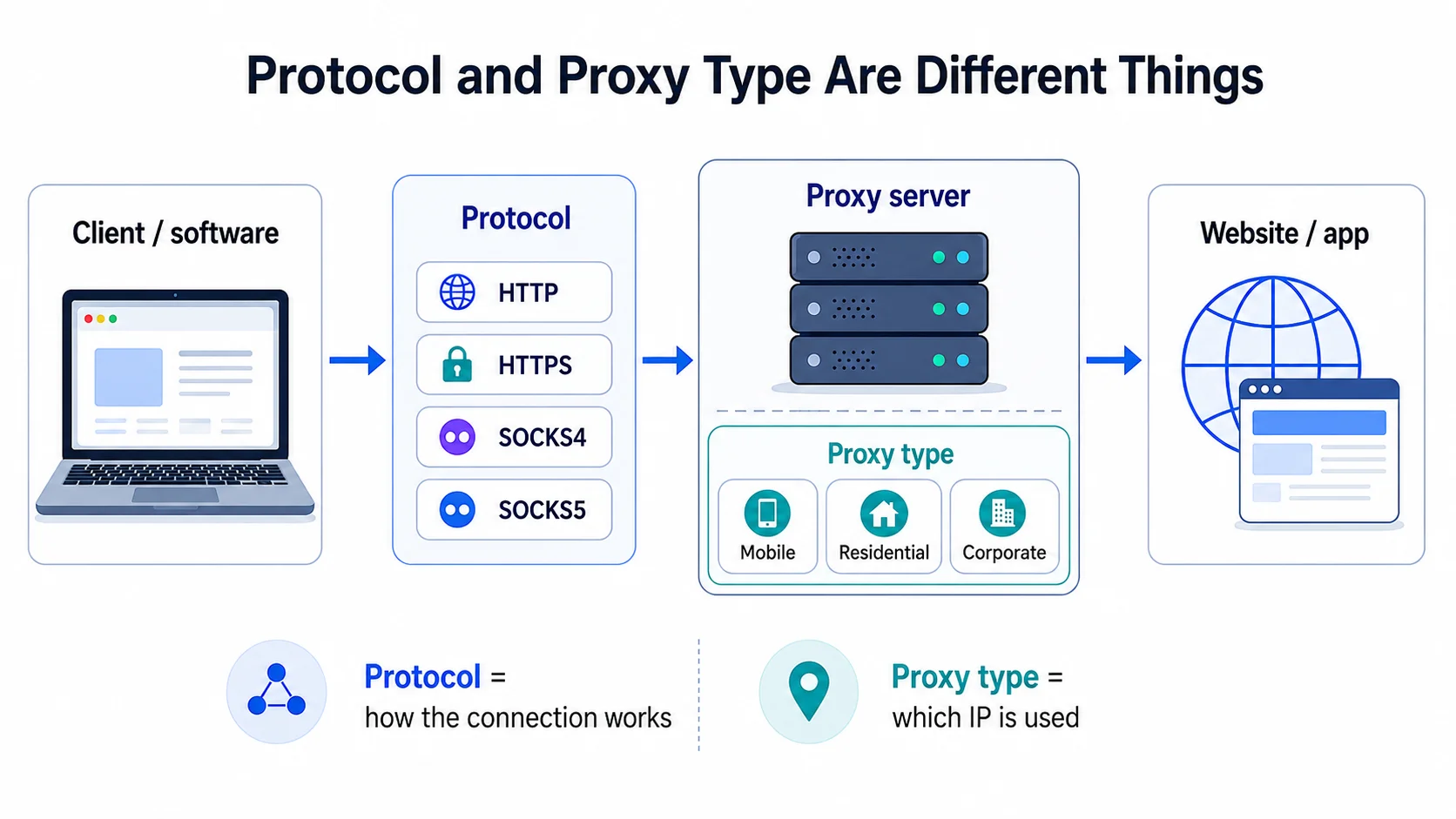
프로토콜은 IP의 출처에 관한 것이 아닙니다. 여러분의 소프트웨어, 브라우저, 스크래퍼나 앱이 프록시에 어떻게 연결해 그 위로 트래픽을 통과시키는지에 관한 것입니다. 프로토콜을 잘못 고르면 멀쩡한 프록시가 “고장난 것처럼” 보일 수 있습니다. 사이트가 열리지 않거나, 인증이 실패하거나, 스크립트가 크래시 나거나, 안티디텍트 브라우저가 프로필을 시작하지 못하는 식입니다.
실무에서 가장 흔한 프로토콜은 HTTP, HTTPS, SOCKS4, SOCKS5입니다. SX.org는 현대적인 연결 방식만을 지원합니다. 이들 간의 차이는 “뭐가 전반적으로 더 낫냐”가 아니라, “특정 작업에 무엇이 맞느냐”입니다.
프록시 프로토콜이란?
간단히 말해, 프로토콜은 여러분의 도구가 프록시 서버와 통신할 때 사용하는 언어입니다.
브라우저, 스크래퍼, 앱은 다음을 이해해야 합니다:
- 어디로 요청을 보낼지;
- 웹사이트 주소를 어떻게 전달할지;
- 인증을 어떻게 처리할지;
- 어떤 데이터를 전송할 수 있는지;
- 일반 웹 트래픽, HTTPS 연결 또는 비표준 네트워크 트래픽을 어떻게 처리할지.
IP 자체는 멀쩡할 수 있습니다. 하지만 소프트웨어가 SOCKS5를 기대하는데 HTTP 프록시를 입력하면 설정이 작동하지 않을 수 있습니다. 반대도 마찬가지입니다. 작업이 단순하고 웹사이트나 API 관련이라면 SOCKS5는 불필요한 복잡성일 수 있습니다.
그래서 “가장 진보된 옵션”이 아니라 작업에 맞춰 프로토콜을 고르는 편이 낫습니다.
HTTP 프록시: 웹 작업에 적합한 단순한 옵션
HTTP 프록시는 웹사이트의 일반적인 논리와 가장 가깝습니다. 전체 프로세스가 웹 요청을 중심으로 구성될 때 적합합니다. 페이지, HTML, JSON, API, 폼, 리디렉트, 헤더, 쿠키 등.
대표적인 작업:
- 페이지 스크래핑;
- HTML 또는 JSON 수집;
- 웹사이트 가용성 확인;
- API 작업;
- SEO 도구;
- 기술 점검;
- 일반적인 브라우저 기반 시나리오.
- HTTP의 가장 큰 장점은 설정이 명확하고 예측 가능하다는 점입니다. 스크래핑, SEO, 브라우저 자동화, 웹사이트 점검용 대부분의 도구가 HTTP 프록시와 정상적으로 작동합니다.
- 예를 들어 상품 카드 수집, 검색 결과 확인, 가격 모니터링, API 테스트를 한다면, HTTP가 가장 직관적인 선택인 경우가 많습니다. 불필요한 복잡성을 더하지 않고 표준 웹 스택에 잘 맞습니다.
문제가 될 수 있는 점:
HTTP는 트래픽이 일반적인 웹 요청을 벗어나는 작업에는 항상 적합하지 않습니다. 앱이 비표준 연결, 별도 라이브러리, 복잡한 네트워크 로직, HTTP 이외의 트래픽을 사용한다면 SOCKS5 지원을 확인하는 것이 좋습니다.
HTTPS 프록시: 별도의 “마법 같은 타입”은 아님
HTTPS를 둘러싼 혼란이 종종 있습니다. 많은 사람들이 HTTPS 프록시를 “HTTP 프록시의 더 안전한 버전” 정도로 생각합니다. 실제로는 HTTPS 웹사이트와 통신할 때 보통 터널이 사용된다는 점을 이해하는 게 더 중요합니다.
브라우저나 소프트웨어가 프록시를 통해 HTTPS로 웹사이트에 연결할 때, 프록시는 보호된 연결의 내용을 읽지 않습니다. 대상 주소로의 터널을 만드는 것을 도와주고, 이후 데이터는 클라이언트와 웹사이트 사이에서 암호화된 형태로 오갑니다.
사용자 입장에선 단순합니다. 브라우저에 프록시를 입력하고 HTTPS 웹사이트를 열면 작동합니다. 하지만 기술적으로는 내부에서 프록시가 대상 서버로 터널을 설정하는 추가 단계가 있습니다.
이게 중요한 경우:
- HTTPS 웹사이트 작업;
- 계정 로그인;
- 브라우저 및 안티디텍트 브라우저 사용;
- 보호된 세션의 안정성이 중요한 시나리오.
- 대부분의 일반 웹 작업에서는 선택을 과도하게 복잡하게 할 필요가 없습니다. 도구가 HTTP(S) 프록시를 받는다면, 그 도구가 기대하는 형식을 그대로 사용하세요.
SOCKS4: 기본 TCP 연결을 위한 구형 옵션
SOCKS4는 구형 프로토콜입니다. SOCKS5 이전에 등장했으며 TCP 연결로 작동할 수 있지만 기능이 더 적습니다.
현대의 작업에서는 SOCKS4 사용 빈도가 낮습니다. 오래된 소프트웨어, 구식 가이드, 단순한 네트워크 도구에서 가끔 볼 수 있습니다. 하지만 일반적인 자동화, 프로필, 복잡한 앱, 현대 웹사이트에는 SX.org의 SOCKS5가 보통 더 나은 선택입니다.
SOCKS4의 핵심 한계는 유연성이 떨어진다는 점입니다. 다양한 주소 타입, 고급 인증, 기본 TCP를 넘어서는 연결이 필요한 시나리오에는 적합하지 않습니다.
SOCKS4로 충분할 수 있는 경우:
- 구형 소프트웨어가 SOCKS4만 지원함;
- 작업이 매우 단순함;
- 기본 TCP 트래픽만 필요함;
- UDP 요건이 없음;
- 복잡한 연결 로직이 없음.
- 대개 더 유연한 트래픽 처리가 필요하면 SOCKS5가 선택됩니다. 결정적인 차이는 SOCKS5가 TCP뿐 아니라 UDP도 지원한다는 점입니다.
- TCP는 데이터 전송의 안정성이 중요한 곳에서 사용됩니다. 웹사이트, 인증, 대시보드, API, 브라우저, 스크래퍼, 대부분의 업무 도구 등. 데이터 전달을 검증해 연결을 예측 가능하게 유지합니다.
- UDP는 다릅니다. 더 빠르지만 전달 검증이 엄격하지 않습니다. 게임, 스트리밍, 보이스, 일부 네트워크 시나리오처럼 전송 속도가 중요한 앱에서 쓰일 수 있습니다.
- 이 때문에 SOCKS5는 SOCKS4보다 범용적입니다. 일반적인 연결뿐 아니라 다양한 유형의 트래픽을 다루거나 TCP/UDP 지원이 직접적으로 필요한 소프트웨어에 유용합니다.
SOCKS5: 더 범용적인 프로토콜
SX.org의 SOCKS5는 HTTP보다 더 낮은 계층에서 동작합니다. 웹 요청에만 묶여 있지 않고 다양한 네트워크 트래픽을 전달할 수 있습니다. 그래서 더 복잡한 시나리오에 자주 선택됩니다.
트래픽이 일반 페이지와 API에 국한되지 않을 때 SOCKS5가 유용합니다. 예를 들어 앱이 자체 연결을 사용하거나, 비표준 라이브러리를 쓰거나, 더 유연한 네트워크 경로가 필요한 경우입니다.
대표적인 작업:
- 복잡한 자동화;
- 웹 트래픽을 넘어서는 트래픽이 있는 앱;
- SOCKS5에서 더 잘 동작하는 안티디텍트 브라우저;
- 멀티스레드 시나리오;
- SOCKS5를 직접 요구하는 소프트웨어;
- 더 범용적인 연결 형식이 필요한 작업.
- SOCKS5의 가장 큰 장점은 유연성입니다. HTTP 프록시처럼 HTTP 요청을 “이해하려” 하지 않습니다. 단지 연결을 다음으로 전달하도록 도와줍니다.
문제가 될 수 있는 점:
SOCKS5가 프록시를 자동으로 더 안전하고, 더 깨끗하고, 더 안정적으로 만들지는 않습니다. IP가 불량이거나, 이력이 나쁘거나, 작업에 맞지 않으면 프로토콜 자체가 그것을 고쳐주지 않습니다. SOCKS5는 잘못된 프로필 설정, 과도한 IP 로테이션, 잘못된 GEO, 수상한 계정 행동 같은 문제도 해결해주지 않습니다.
프로토콜은 그저 한 겹의 요소일 뿐입니다. IP 유형, GEO, 로테이션, 세션 설정, 도구의 행동이 여전히 중요합니다.
HTTP 또는 SOCKS5: 무엇을 선택해야 할까요?
프로토콜을 고르는 가장 쉬운 방법은 이름이 아니라 여러분의 작업 방식에 주목하는 것입니다.
작업이 일반 웹사이트, API, HTML, JSON, SEO, 페이지 스크래핑과 관련된다면 보통 HTTP면 충분합니다. 더 단순하고 명확하며 실전에 투입하기도 빠릅니다.
작업이 앱, 비표준 트래픽, 복잡한 자동화 또는 소프트웨어가 직접 SOCKS5를 요구하는 경우라면 SOCKS5가 더 낫습니다.
간단한 규칙:
- 일반 웹사이트, API, HTML, JSON — HTTP;
- HTTPS 웹사이트와 브라우저 시나리오 — 적절한 터널 지원이 있는 HTTP(S);
- 비표준 앱이나 복잡한 소프트웨어 — SOCKS5;
- 구형 도구 — 대안이 없을 때 가끔 SOCKS4;
- 확신이 없다면 — 여러분의 소프트웨어 문서에 적힌 프로토콜부터 시작.
프로토콜은 올바른 프록시 유형을 대체하지 않습니다
초보자 실수 중 하나는 SOCKS5가 “더 좋다”는 이유로 어디에나 써야 한다고 생각하는 것입니다. 실제로는 그렇지 않습니다.
검색 결과나 마켓플레이스 스크래핑에는 SOCKS5보다 올바른 GEO의 레지덴셜 프록시가 더 중요할 수 있습니다. SMM과 계정 작업에는 안정적인 세션, 명확한 국가, 신중한 로테이션, 깨끗한 IP 이력이 더 중요합니다. 이것이 바로 SX.org가 제공하는 것입니다. 기술 점검과 대량 요청에는 속도와 확장성이 더 중요할 수 있으므로 기업형 또는 데이터센터 프록시가 더 논리적일 수 있습니다.
프로토콜은 연결 형식을 정의합니다. 프록시 유형은 웹사이트가 보게 되는 IP를 정의합니다.
둘은 같은 설정의 서로 다른 계층입니다.
예를 들어:
- 모바일 프록시 + SOCKS5는 모바일 시나리오와 유연한 트래픽 전달이 필요한 소프트웨어에 적합;
- 레지덴셜 프록시 + HTTP는 웹 스크래핑, 지역 검색 결과, 웹사이트 점검에 적합;
- 기업형 프록시 + HTTP는 빠른 기술 작업, API, 대량 처리에 편리;
- 레지덴셜 프록시 + SOCKS5는 연결 유연성과 자연스러운 IP 프로필이 모두 중요한 복잡한 앱에 적합.
프로토콜 때문에 프록시가 작동하지 않을 수 있는 이유
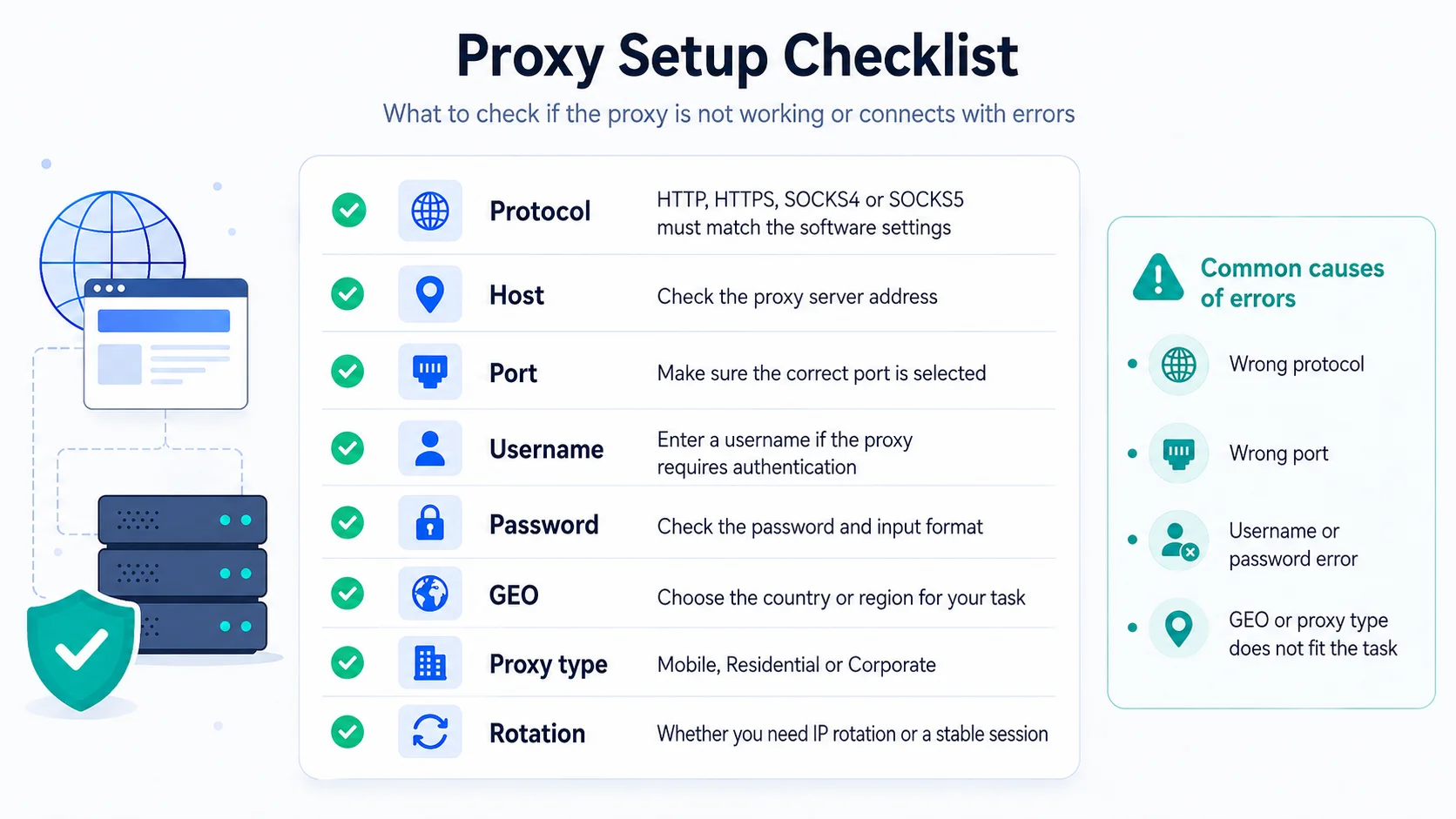
가끔 사용자가 좋은 프록시를 구매해 프로그램에 입력하자마자 에러가 납니다. 이게 항상 IP가 나쁘다는 뜻은 아닙니다.
흔한 이유:
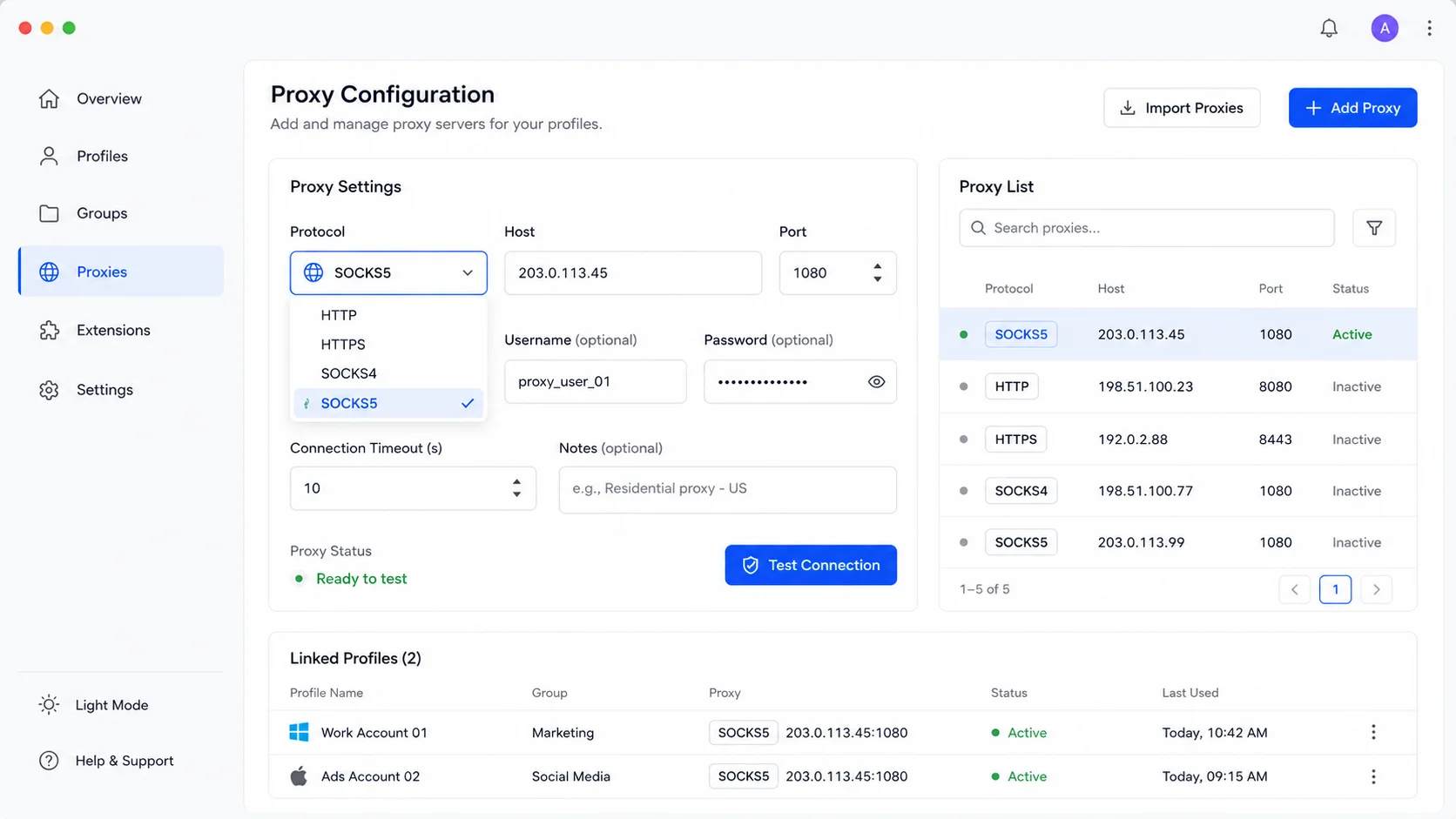
- 소프트웨어에서 HTTP가 선택되어 있는데 프록시는 SOCKS5로 입력됨;
- 포트가 잘못 지정됨;
- 도구가 선택한 프로토콜을 지원하지 않음;
- 인증 정보가 잘못된 형식으로 입력됨;
- 터널 지원이 올바르게 동작하지 않아 HTTPS 웹사이트가 열리지 않음;
- 앱이 HTTP 프록시가 요구하는 방식대로 처리하지 못하는 트래픽을 사용함.
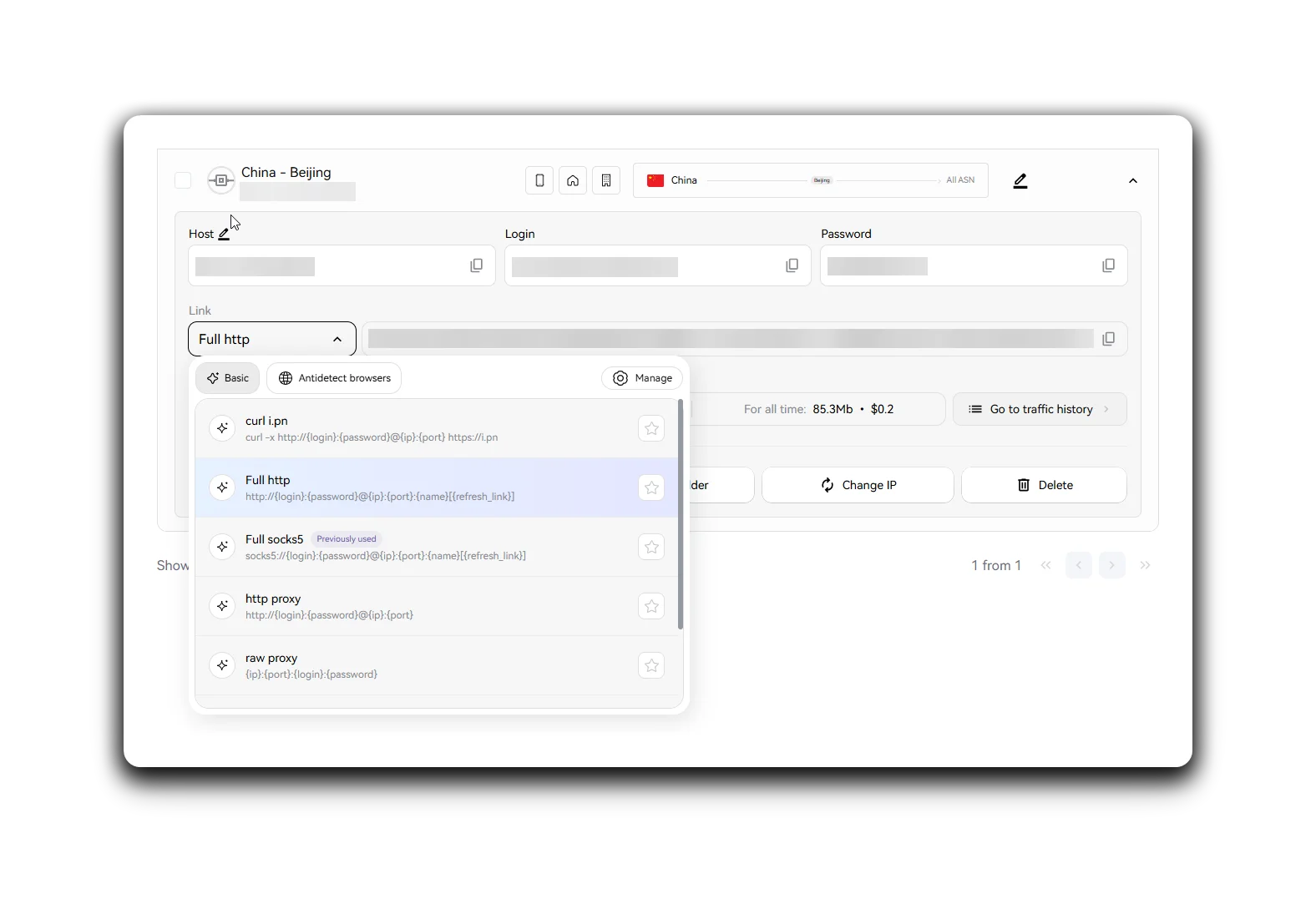
- 공급자를 바꾸기 전에 기본 사항을 확인할 가치가 있습니다. 프로토콜, 포트, 로그인, 비밀번호, 인증 방식, 소프트웨어 요구사항.
특히 팀 워크플로에서 한 사람은 프록시를 구매하고, 다른 사람은 안티디텍트 브라우저를 설정하고, 세 번째는 스크래퍼를 실행하고, 네 번째가 왜 모든 게 망가졌는지 이해하려 애쓰는 상황에서는 더욱 중요합니다.
SX.org에서의 동작 방식
SX.org에서는 “뭐가 더 좋을까”라는 추상적 기준이 아니라 작업에 맞춰 프록시를 선택할 수 있습니다. 모바일, 레지덴셜, 기업형 프록시가 다양한 시나리오에 제공됩니다. 설정 시 여러분의 도구가 어떤 프로토콜을 지원하는지(HTTP(S) 또는 SOCKS5) 확인하는 것이 중요합니다.
스크래핑, SEO, 웹사이트, API를 다룬다면 보통 HTTP 프록시로 시작하는 게 편리합니다. 복잡한 소프트웨어, 안티디텍트 브라우저, 더 유연한 연결이 필요한 앱을 사용한다면 SOCKS5를 사용할 수 있습니다.
논리는 간단합니다:
- 먼저 작업을 정의하세요;
- 그다음 IP 유형을 고르세요;
- 그다음 프로토콜을 선택하세요;
- 이후 GEO, 로테이션, 세션 설정을 정하세요.
- 이렇게 하면 불필요한 형식에 과금하지 않고, 잘못된 한 가지 설정 때문에 멀쩡한 구성을 망치지 않습니다.
간단한 결론
프록시 프로토콜은 “개발자를 위한 복잡한 기술적 디테일”이 아닙니다. 도구가 프록시에 제대로 연결할 수 있는지를 좌우하는 기본 설정 요소입니다.
HTTP는 대부분의 웹 작업에 적합합니다. 웹사이트, API, 스크래핑, SEO, 점검, 브라우저 시나리오.
HTTPS는 보호된 웹사이트와 프록시 터널링과 더 관련이 있으므로, 도구가 이 형식을 제대로 지원하는지가 중요합니다.
SOCKS4는 오늘날 거의 필요하지 않은, 더 제한적인 구형 옵션입니다.
SOCKS5는 복잡한 소프트웨어, 비표준 트래픽, 유연한 네트워크 시나리오를 위한 보다 범용적인 프로토콜입니다.
최고의 선택은 가장 “강력한” 프로토콜이 아니라, 여러분의 작업, 소프트웨어, 프록시 유형에 맞는 프로토콜입니다.
SX.org와 함께라면 추측 없이 이 시스템을 설정할 수 있습니다. 프록시 유형을 고르고, 올바른 GEO를 지정하고, 도구가 지원하는 프로토콜을 사용해, 테스트가 정기적인 프로세스로 자리 잡을 때 워크플로를 확장하세요.