
Anonym Browser: A Next-Generation Antidetect Browser Paired with SX Proxies
A modern antidetect browser is no longer just about digital fingerprint management. It is a complete working environment with isolated profiles, proxies, teamwork tools, automation and scaling capabilities.
At the same time, the antidetect browser category largely continues to operate by the standards of legacy professional software: complex interfaces, an excessive amount of manual routine and workflows that require prolonged onboarding. For conventional applications, this approach is becoming an exception; users are accustomed to complex technology being streamlined behind an intuitive and responsive interface.
Anonym Browser was designed around a different concept: an antidetect browser is also a modern application. Professional depth should not mean operational complexity.
For this reason, a single product integrates profiles, teamwork features, environments, data migration, multi-level automation, a local API and AI agent control via MCP. Daily operations remain straightforward, while most of the technical complexity stays handled within the product itself.
A distinct component of any operational setup is the network layer. Here, Anonym Browser can be paired with an external proxy provider such as SX.ORG. Below, we break down the approach of Anonym Browser and show how it integrates with SX.ORG proxy infrastructure in real-world workflows.
An Antidetect Browser as a Standard Modern Application
At the core of Anonym Browser are isolated browser profiles. Each profile maintains its own cookies, browsing history, proxies and digital fingerprint parameters. Users can configure operating system parameters, User-Agent, WebRTC, language, timezone, geolocation, Canvas, WebGL, WebGPU, fonts, AudioContext, screen resolution, media devices, CPU/RAM allocations and other parameters.
At the same time, users do not need to assemble a digital fingerprint from dozens of values manually. For most tasks, a consistent preset configuration can be applied, adjusting individual parameters only when strictly necessary.
The same logic applies to daily routine. Profiles can be created individually, in bulk or via a quick-creation mode. Frequently used setups can be saved as presets, while organization is maintained through tags, statuses, notes, filters and bulk actions. Active profiles are displayed in a separate view, eliminating the need to search for active sessions across an entire database.
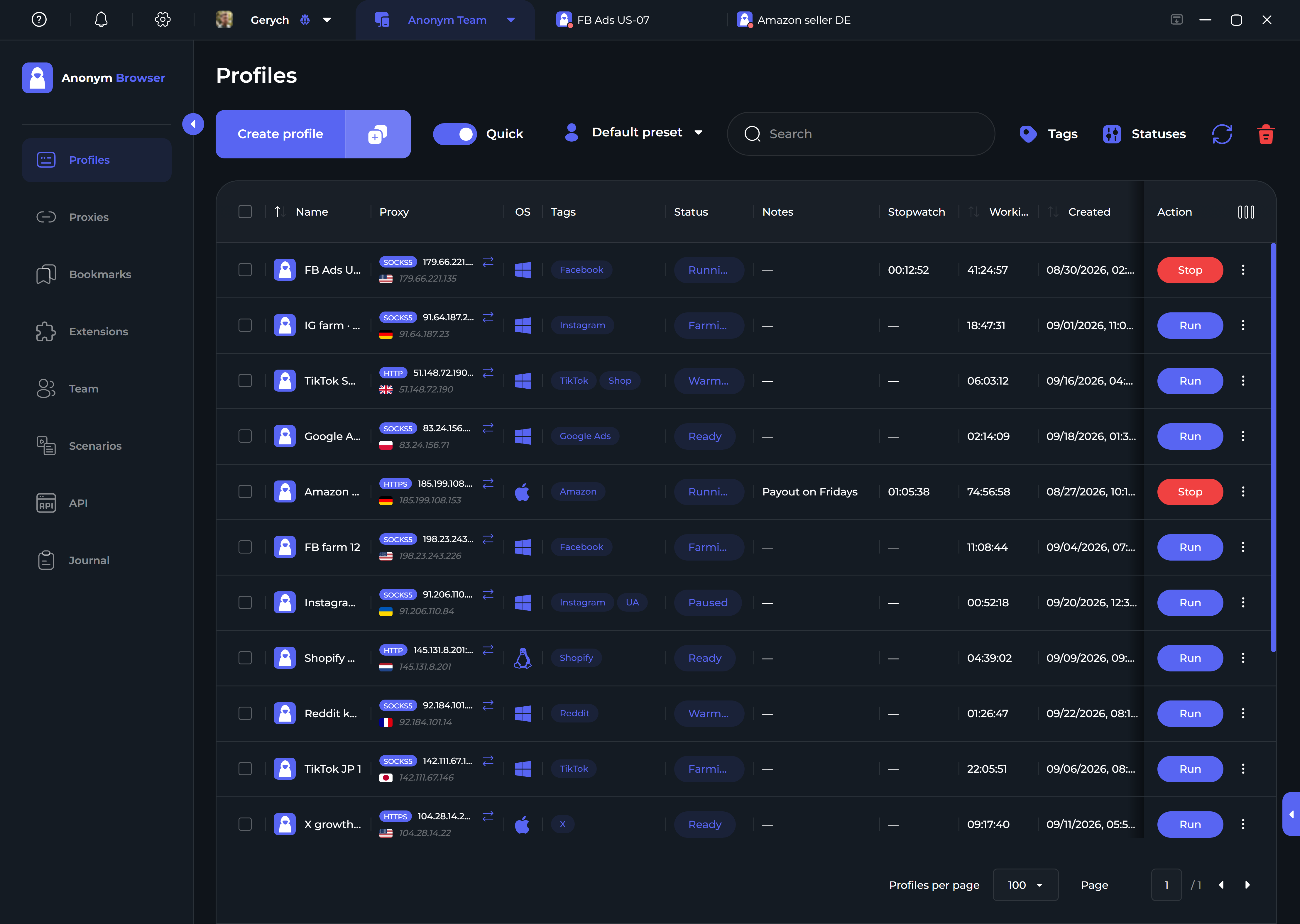
The core principle is straightforward: product depth must provide users with greater capabilities, not an increased manual workload.
Teamwork Without the Compromise Between "Grant All" and "Grant Nothing"
For a solo user, a permissions system is practically invisible. In a media buying or agency team, it quickly becomes part of daily operations.
One team member needs to launch profiles without deleting someone else’s assets. Another needs to work with accounts without accessing team-wide administrative settings. A team lead requires comprehensive oversight, while an external contractor only needs permission for a specific set of actions.
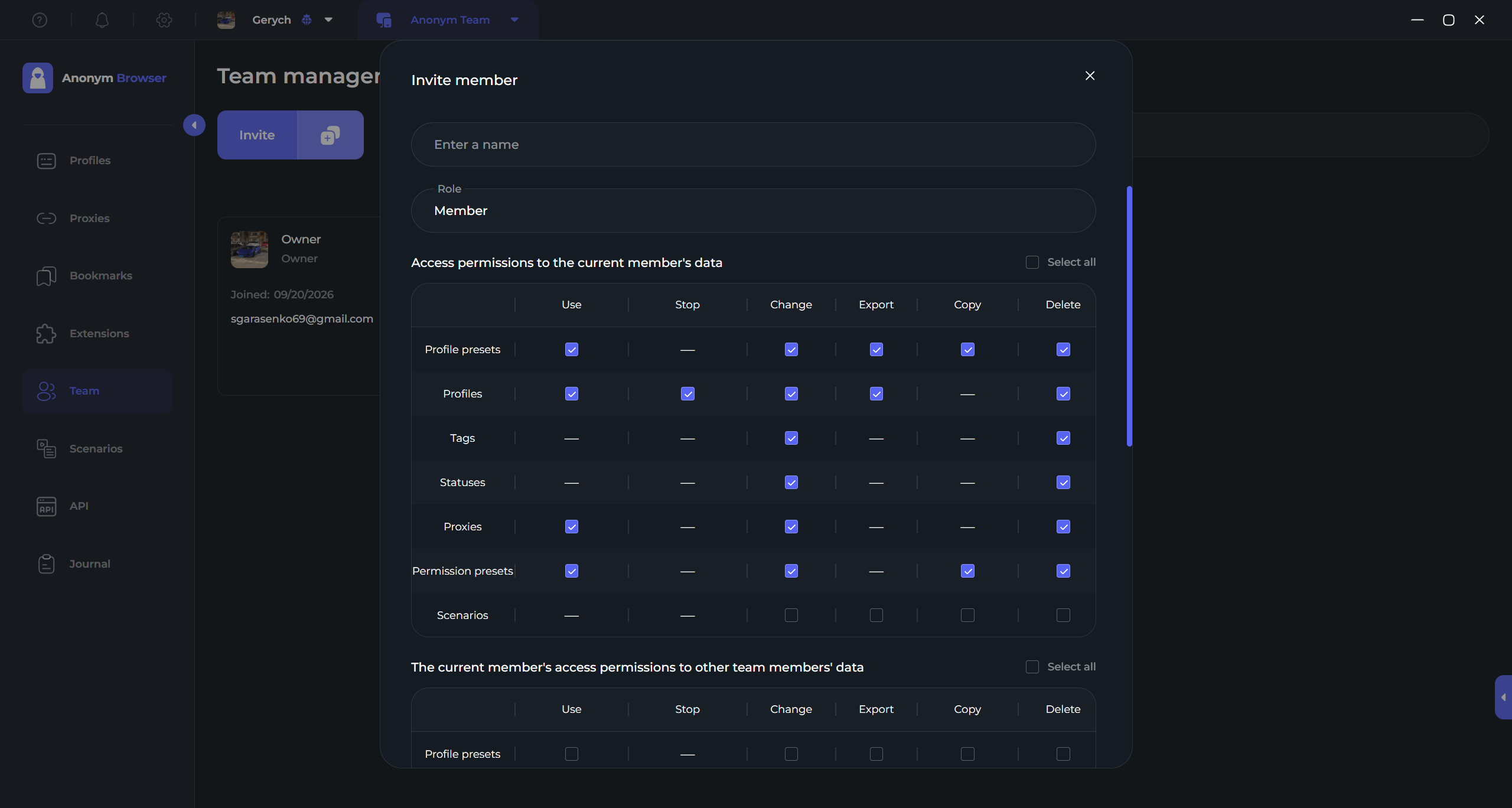
Because of this, Anonym Browser is not restricted to several generic roles. Permissions are configured granularly for actions involving profiles, proxies, tags, statuses, bookmarks, extensions and other entities.
A particularly critical differentiator is the separation of permissions between personal and shared team data. For example, a team member can be permitted to edit their own profiles while restricted from modifying profiles created by colleagues.
Taking individual actions and access levels into account, the platform provides approximately 70 configurable access controls. This ensures each person receives precisely the capabilities required for their role, while team activity is tracked via an audit activity log.
Environments: Full Project Infrastructure in One Place
A regular folder simply groups profiles together. However, a real project includes more than profiles: it requires proxies, extensions, bookmarks, automation scripts, team members and specific access rules.
In Anonym Browser, all of these components are consolidated into Environments.
For instance, one dedicated environment can be established for Meta Ads US, a second for TikTok Europe and a third for a specific agency client. Each environment contains its own profiles, proxies, extensions, bookmarks and automation scripts, while team environments also include assigned members with configured permissions.
As a result, operations are structured around the project as a cohesive whole, rather than an unmanageable list of browser profiles.
Migrating from Another Antidetect Browser
One of the primary reasons users stay with legacy software for years is the friction of migration.
When managing only a few profiles, trying out a new browser is simple. When managing hundreds, one must account for cookies, proxies, digital fingerprints, tags, statuses and team hierarchies.
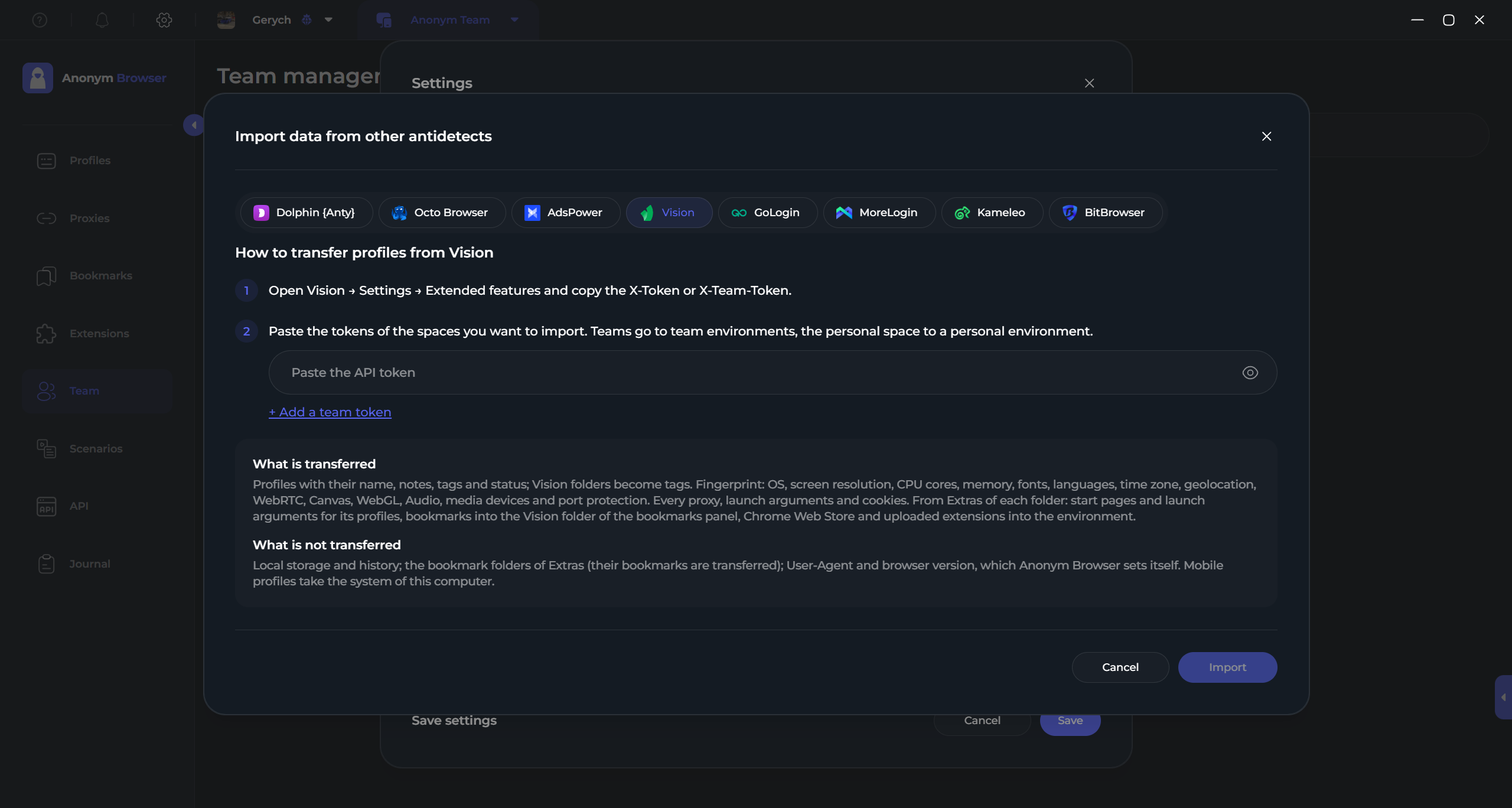
Therefore, migration capabilities are built directly into Anonym Browser. Currently, direct data transfer is supported from eight antidetect browsers:
- Dolphin Anty;
- AdsPower;
- GoLogin;
- MoreLogin;
- Kameleo;
- BitBrowser;
- Octo Browser;
- Vision.
The scope of transferable data depends on the source software. For example, Octo Browser allows exporting profiles, digital fingerprints, proxies, tags and cookies.
For Vision, migration runs deeper: alongside profiles, digital fingerprints, proxies, tags, statuses and cookies, start pages, bookmarks and extensions are also imported. Vision teams can be transferred into separate team environments within Anonym Browser together with their member hierarchy.
The objective of this migration flow is not merely creating blank new profiles but preserving the existing working infrastructure as fully as possible.
Automation: From Bulk Operations to a Local API
Not every recurring task requires dedicated developer resources. For this reason, automation in Anonym Browser is structured across several distinct levels.
For basic operations, bulk actions are available. For automated browsing and cookie accumulation, there is the Cookie Robot. More sophisticated workflows are assembled via custom scenarios: opening pages and tabs, clicking, typing text, handling files, reading URLs and DOM elements, using variables, running custom JavaScript, integrating external captcha-solving services and configuring conditions and loops.
When a team requires a private automated infrastructure, a local API is accessible. Through the API, users can manage environments, profiles, cookies, proxies, tags, statuses, bookmarks, extensions, team members, access permissions, scenarios and other entities. Up to 300 profiles can be created in a single request within the account's plan limits.
This provides a clear technical escalation path:
Bulk actions → Cookie Robot → Scenarios → Local API.
Users can start with accessible UI tools and transition to deeper automation levels only when their operational scale demands it.
MCP: Assigning Tasks to AI Using Plain Natural Language
Another automation tier is the Model Context Protocol (MCP).
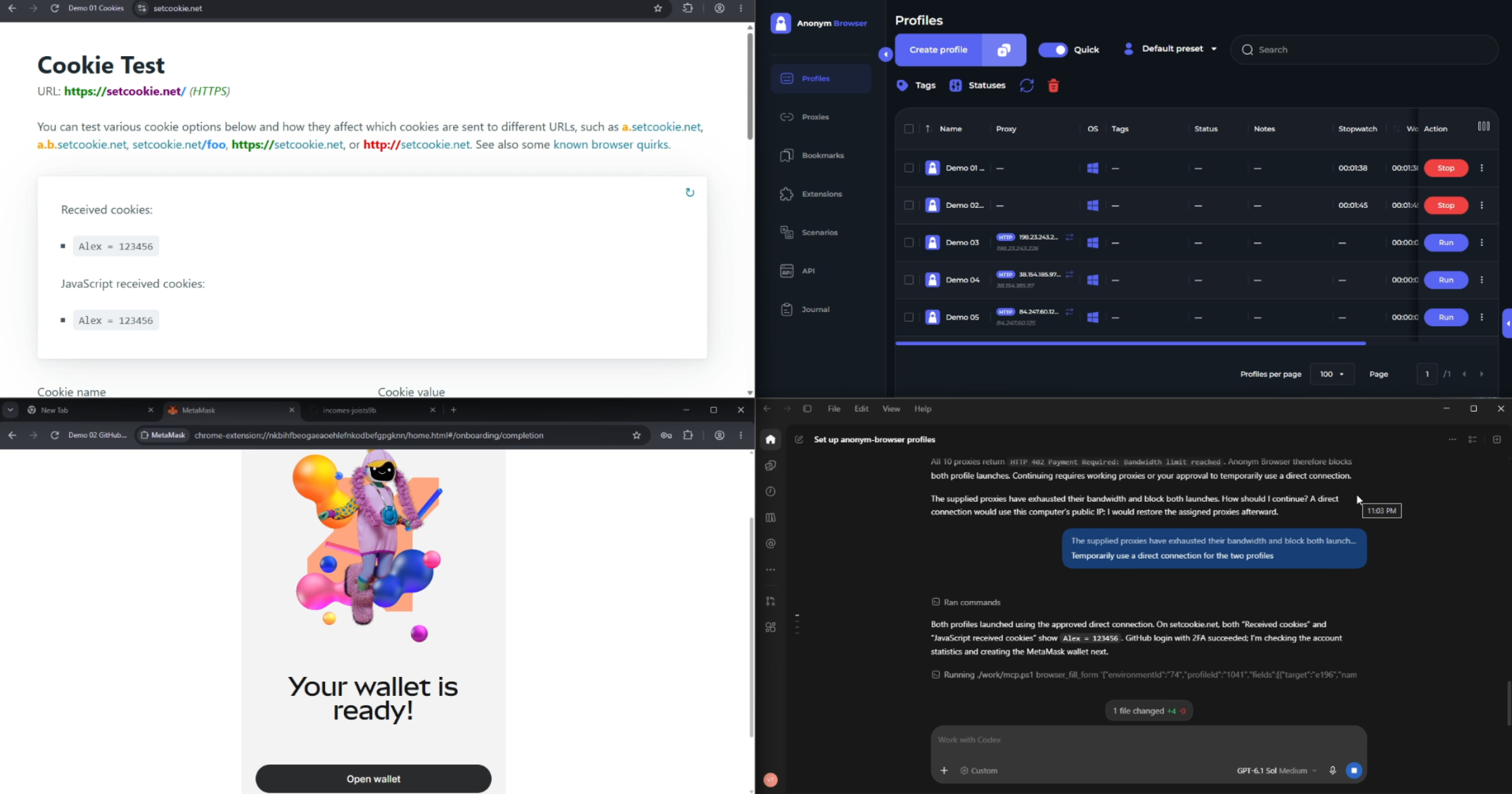
Anonym Browser supports connecting compatible AI agents and assigning operational tasks using plain natural language prompts. An agent can generate profiles, attach proxies, import cookies, manage environments and execute various operations within the application.
Crucially, AI operations are not confined to managing profile lists. Through the same MCP interface, the agent can continue its execution inside a running browser profile: opening web pages and tabs, interacting with web elements and completing subsequent steps required by the prompt.
This enables users to specify the desired end result directly, rather than executing repetitive manual steps.
Why the Browser Environment and Proxies Must Be Configured Together
An antidetect browser handles the client-side layer of a digital profile: data isolation, hardware fingerprint emulation, regional localization parameters, proxy routing inside the profile, WebRTC controls, DNS resolution and workspace management.
A proxy provider handles the opposing layer: delivering an external IP address and governing network connection telemetry. Relevant factors here include network type, geolocation, ASN, pool clean score, IP longevity, supported network protocols and rotation logic.
Both layers dictate whether an account’s technical profile appears cohesive to verification systems. The objective of a reliable setup is eliminating technical discrepancies, ensuring the digital identity behaves naturally like an authentic residential user.
For the network layer, SX can be integrated alongside Anonym Browser.
SX.ORG: Mobile, Residential and Corporate Proxies
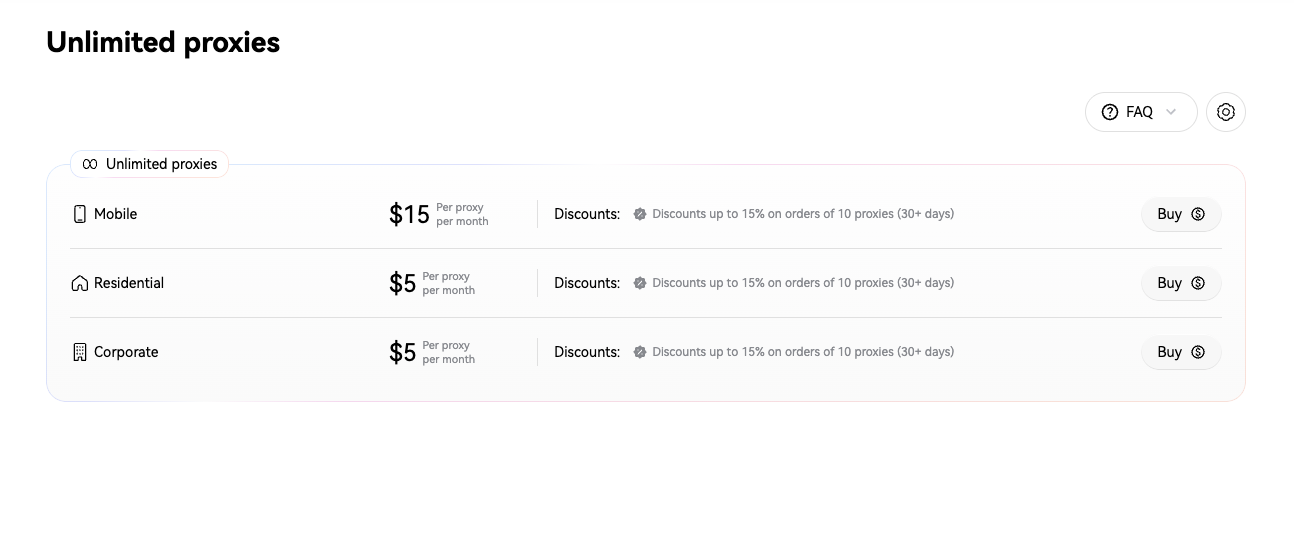
SX.ORG provides three primary network categories: Mobile, Residential and Corporate.
Mobile proxies route traffic through cellular carrier IP pools, Residential proxies utilize home ISP connections and Corporate proxies serve specific data-center or business-network requirements.
SX.ORG allows targeting by country, region, city and ASN. This is convenient when structuring distinct environments in Anonym Browser for different projects or geographical regions.
For example, a US project can be isolated into its own environment with dedicated profiles and a matching pool of SX.ORG US proxies. A European project can run in a separate environment backed by an EU proxy pool.
As a result, proxy routing becomes an architectural element of the project structure, rather than an arbitrary string pasted manually into individual profiles.
Standard and Premium Tiers for Different Workflows
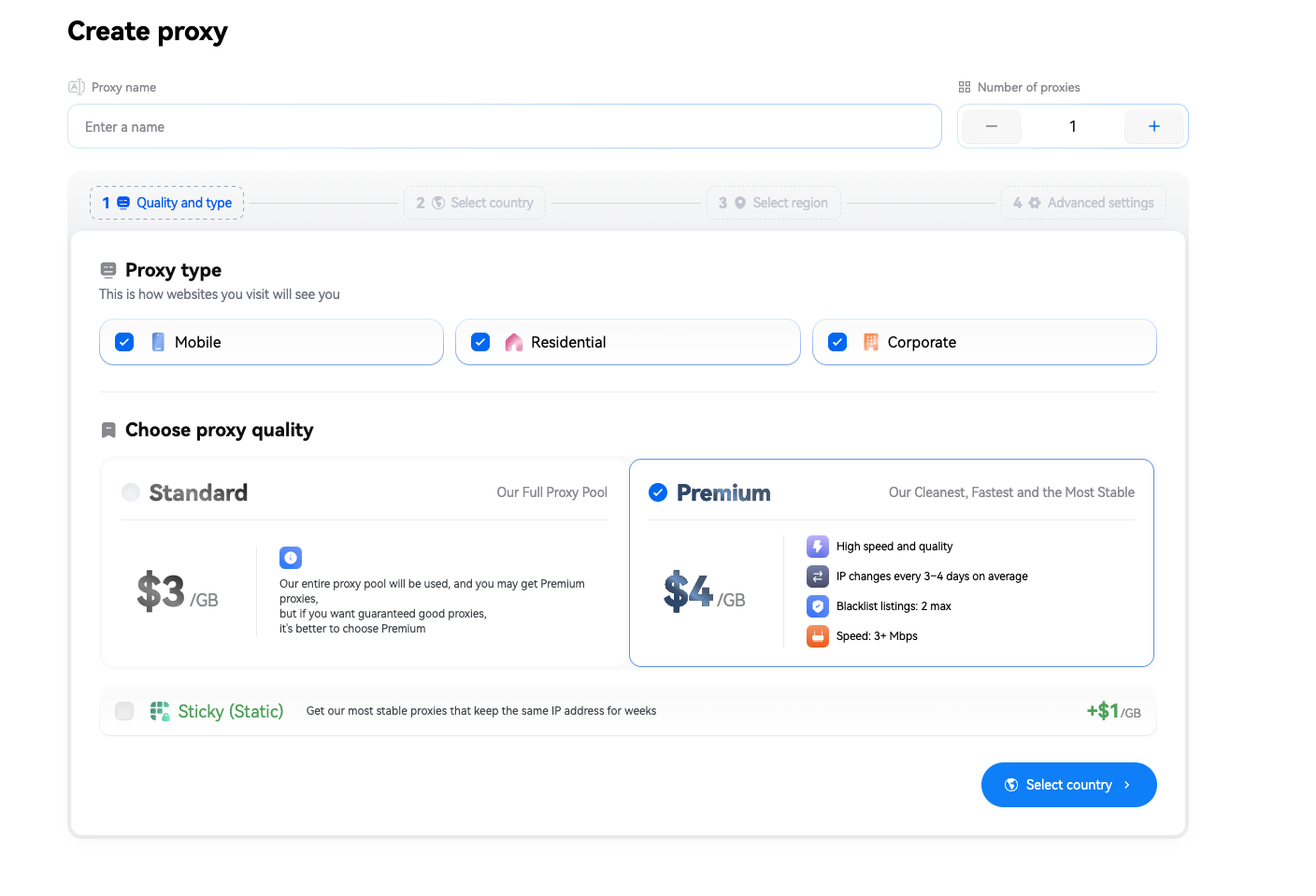
SX.ORG offers two main quality tiers: Standard and Premium.
Standard is suited for workflows that do not require strict connection stability or dedicated IP reputation. Premium is designed for demanding environments and, according to SX.ORG benchmarks, uses stricter pool filtering.
Under the SX.ORG pricing model, Standard pricing starts at $3 per GB, while Premium starts at $4 per GB. For select proxy types, unlimited monthly bandwidth plans are also available. Current pricing and terms should be verified directly within SX.ORG, as plan terms may be updated.
When selecting a plan, it is practical to evaluate not only raw traffic costs but operational requirements: session duration, expected bandwidth consumption, target geolocation and IP rotation tolerance.
Sticky, Soft, Strict and Rotating IP Modes
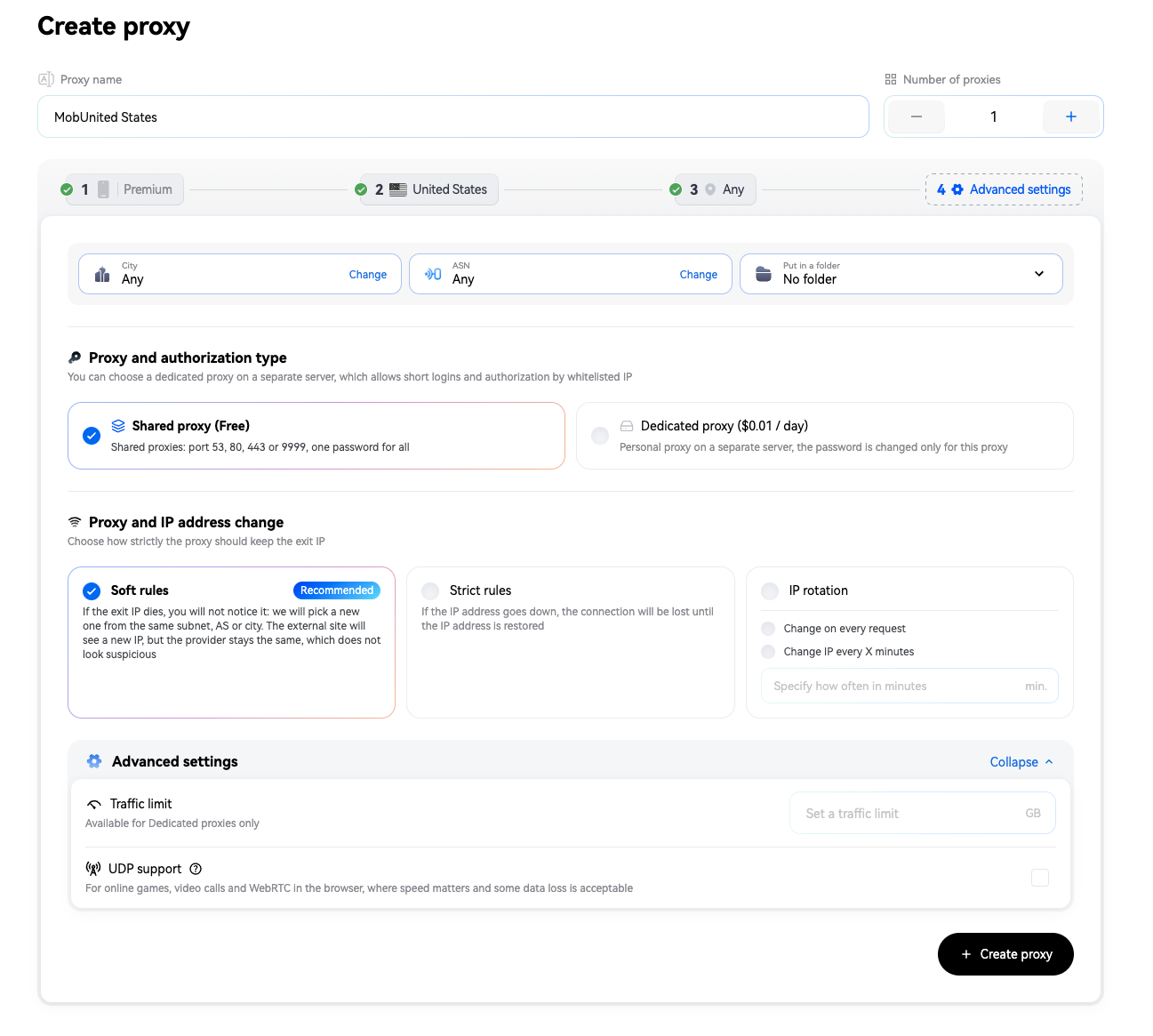
The originating IP address of a session is important but how the connection behaves downstream is equally critical.
Sticky IP mode is used when a single IP address must be retained for the maximum possible duration.
Under Soft rules, if the primary exit node goes offline, the connection continues seamlessly through a compatible IP within the same subnet, city and ASN.
Strict rules are required for workflows where any IP change is unacceptable: if the assigned IP drops, connection routing terminates until that exact IP address recovers.
Standard dynamic IP rotation is also supported, cycling on every web request or at specified time intervals.
There is no universally optimal mode. The choice depends on workflow priorities: persistent session duration, IP consistency or regular IP cycling.
How to Connect SX.ORG Proxies to Anonym Browser
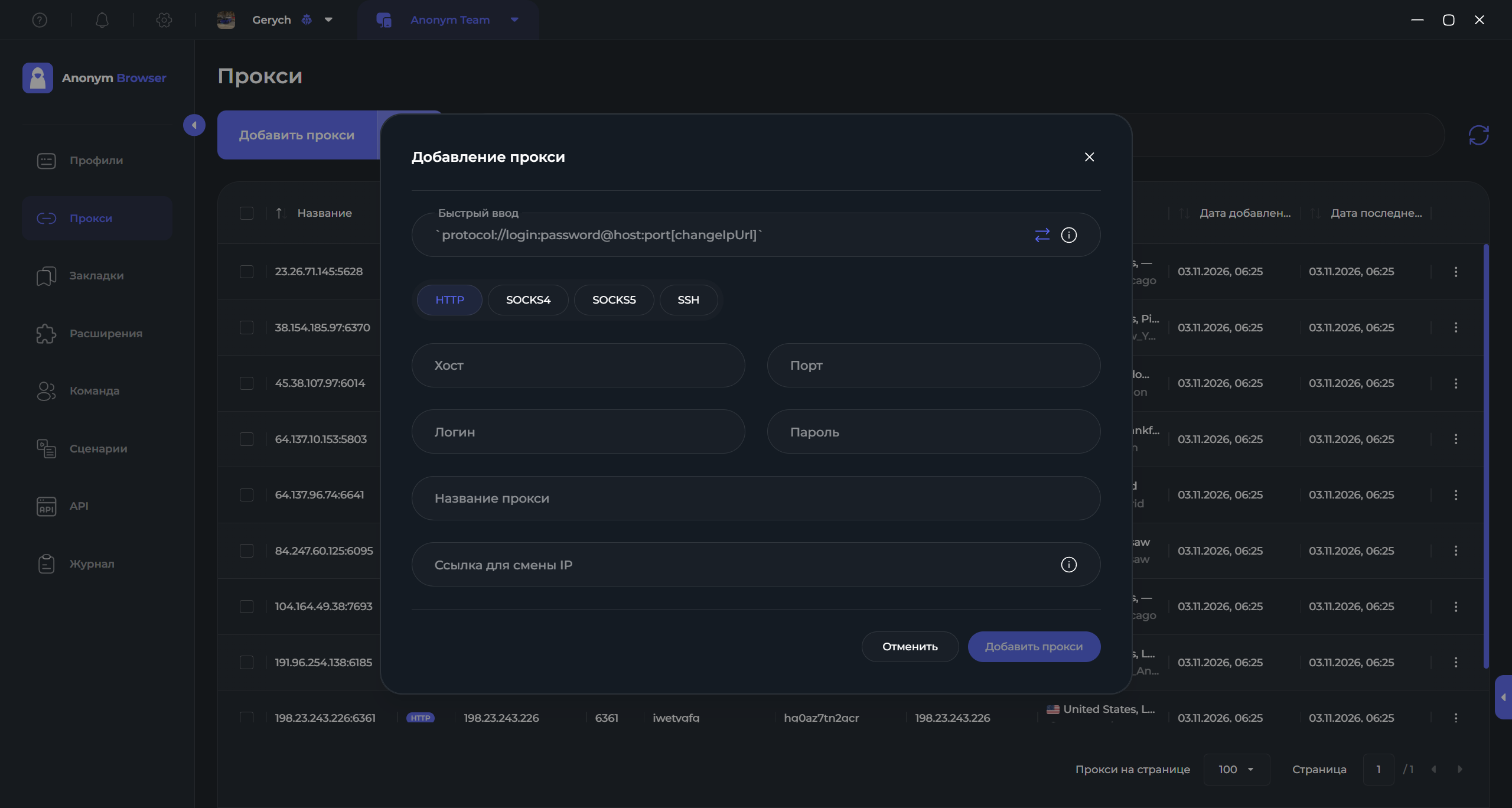
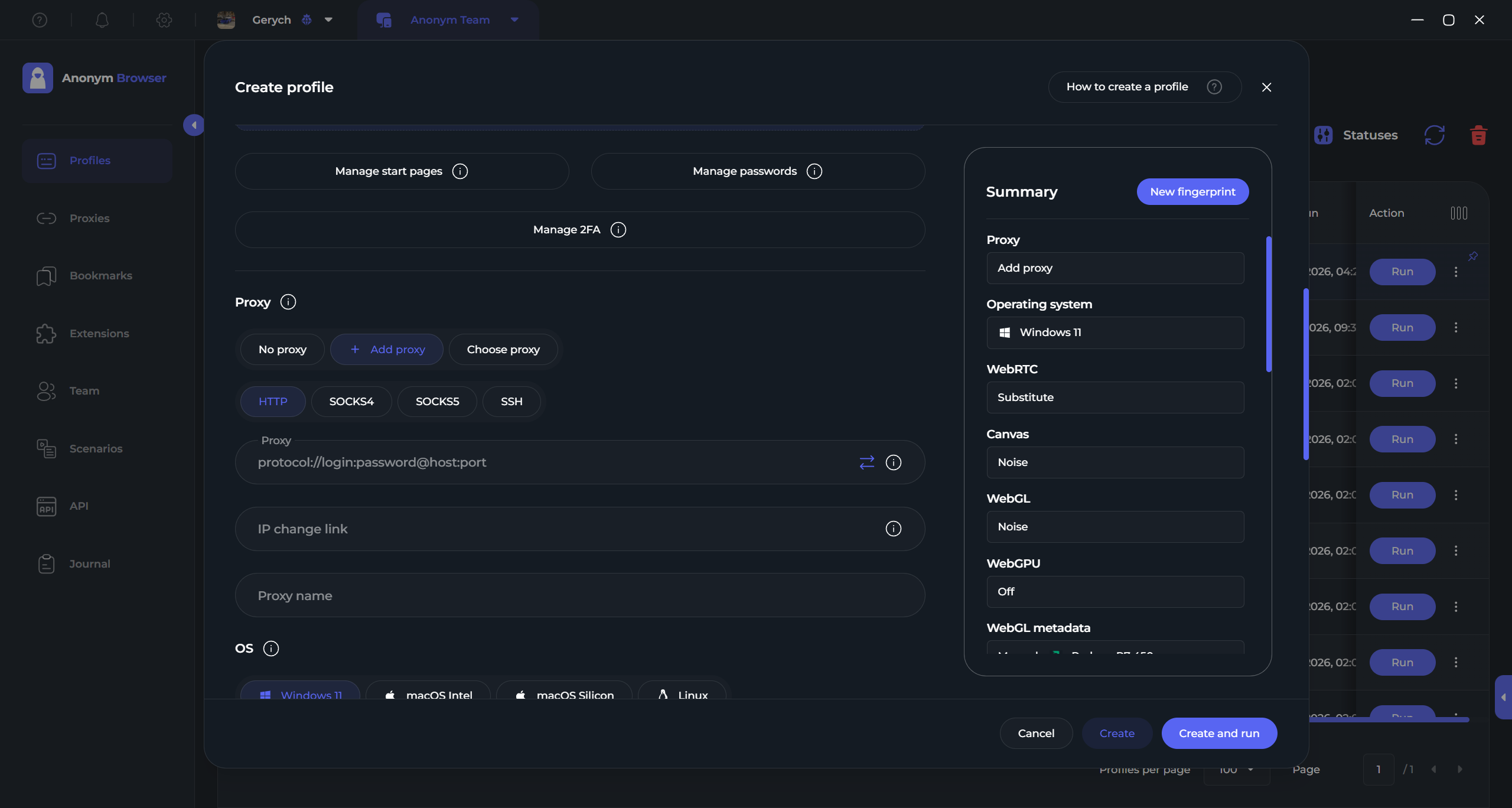
Anonym Browser supports HTTP, SOCKS4, SOCKS5 and SSH proxies, across both IPv4 and IPv6. Proxies can be added manually, pasted as a raw list or imported in bulk from files.
Standard proxy connection string formats are supported out of the box, eliminating the need to manually fill in host, port, login and password fields for each profile when handling large fleets.
The practical integration flow is as follows:
- Select the required network type and geolocation in SX.ORG
- Retrieve connection credentials.
- Import the proxies into Anonym Browser.
- Run a connection test.
- Assign the proxy to a profile or group of profiles.
- Verify regional and network parameters.
- Launch the working session.
Anonym Browser can be set to restrict profile launching if the assigned proxy is offline. Once the connection test succeeds, regional data associated with the active proxy updates automatically.
When managing tens or hundreds of profiles, this process scales across environments, bulk operations, the local API or MCP.
SOCKS5 UDP, WebRTC, QUIC and DNS
A profile’s network context extends beyond its external IP.
Anonym Browser supports SOCKS5 UDP for QUIC and WebRTC routing, provided the proxy configuration supports UDP. In addition, a dedicated "Disable WebRTC UDP" toggle is available to prevent unwanted WebRTC UDP leaks bypassing the proxy tunnel.
DNS resolution can also be configured: using automatic provider settings, custom DNS servers or DNS-over-HTTPS (DoH).
SX.ORG in turn, supports UDP on compatible proxy configurations.
Therefore, prior to starting operations, it is best practice to verify not only IP assignment but geolocation, timezone alignment, WebRTC routing, DNS servers, connection stability and session logic. External checker tools help evaluate your technical fingerprint from an outside perspective, though they cannot guarantee how a specific platform will evaluate an account.
The Details Defining Overall Product Quality
A modern product is defined not by a single standalone feature but by dozens of small optimizations that eliminate manual overhead.
Anonym Browser can store TOTP seeds, automatically generating valid 2FA codes once credentials are submitted. Extensions and bookmarks can be preconfigured at the environment level.
Profiles support both local and cloud storage, while cloud synchronization can transfer passwords, 2FA configurations, browsing history, tabs and extension state across devices.
Deleted profiles are retained in a trash bin, proxies can be validated prior to launch and active running sessions are grouped into a dedicated panel view.
Individually, these are minor conveniences. Together, they reflect the overarching philosophy: users should not have to constantly reshape their workflows around software limitations.
What a Modern Antidetect Browser Should Look Like
The antidetect browser ecosystem no longer suffers from a lack of baseline features. Profiles, proxies, teamwork tools, APIs and automation scripts have become industry baselines.
The next competitive frontier is the inherent quality of the product experience.
Must a user spend weeks adapting to an interface? Can team access be separated with precision? Can an existing setup be migrated cleanly from another platform? Can an operator begin with straightforward bulk UI actions, progress to custom automation scripts and APIs and subsequently delegate tasks to an AI agent?
Anonym Browser is built around the premise that professional depth and usability no longer need to conflict.
It is not merely a tool built exclusively for teams, automation or proxy routing. It represents an effort to elevate the baseline of what a modern antidetect browser can be: from the very first profile created, through scaled team environments, to AI-driven automation workflows.
SX.ORG handles the network layer in this stack: supplying IP assets, precise geolocations, ASN targeting, diverse carrier connection types and configurable session rotation rules. Combined, these tools enable an integrated working setup where client-side and network-side components are configured coherently and scaled in unison.
An antidetect browser should meet the expectations of modern consumer software. Anonym Browser demonstrates what this standard looks like in practice.
Try Anonym Browser
During the open beta period, up to 500 profiles, up to 10 team seats and the full suite of platform features-including MCP-are available free of charge for the duration of the beta.