
How to Run TikTok Ads in 2026 Without Bans: Cloaking.House
TikTok remains one of the most profitable traffic sources for affiliate marketing, but in 2026 its AI moderation has become much more suspicious than before. The system no longer checks just your landing page. It also evaluates the metadata of creatives, the quality of the proxy IP address, and even the hardware fingerprint of the device. To successfully work with gray verticals, you need multi-level protection that does not arouse suspicion from the platform's algorithms at every stage.
This guide breaks down the entire launch process - from preparing tools to enabling a ready-made advertising campaign based on the file "Как запускать рекламу в TikTok Ads в 2026 году без блокировок_ Cloaking.House.md".
1. What you will need before launch
- Cloaking.House: a cloud-based traffic filtering service. It allows you to manage who sees which page and quickly update the IP address databases of moderators without changing the site code.
- White page and offer page: a "safe" site that passes moderation (it can be created in the built-in Cloaking.House generator), as well as a page with your real offer.
- ISP proxies: static IP addresses work best. TikTok is very sensitive to network quality, so setups usually use SX-level pools: they simulate a real home connection and noticeably increase account trust.
- Accounts: the foundation of the whole scheme. Use well-farmed accounts or verified agency accounts, as they pass moderation more reliably.
- Domain and hosting: give preference to .com, .net, or .org domain zones. You will need hosting with PHP 7.4+ for the content substitution scripts to work correctly.
2. Basic rules for working with TikTok
- Unique creatives: TikTok quickly recognizes reused videos. Unique your footage using neural network tools and always remove metadata (EXIF).
- Pixel warming: for at least the first 24 hours, leave the campaign on pure white traffic so the pixel gathers the first data without raising suspicions.
- Gradual scaling: do not start with budgets from $500. Start with $20-50 and give the algorithm time to get used to your domain.
- High-quality white page: in 2026, a "Low Quality Landing Page" causes bans more often than the offer itself. Create the page using AI.
3. Creating a white page for TikTok: requirements and options
In TikTok Ads, a white page serves as a kind of insurance. Moderation evaluates how user-friendly the site is for a mobile user. If the page is poorly adapted or looks like an empty placeholder, the advertising campaign is blocked.
Technical requirements:
- Mobile-first design: about 99% of TikTok traffic comes from mobile devices. Check responsiveness and make sure the site loads instantly.
- Relevance to the creative: if the video talks about beauty secrets, the white page should look like a cosmetology blog. Keywords from the video subtitles must be present on the page.
- Legal section: a Privacy Policy, Terms of Use (Terms), and contact details are mandatory. TikTok checks them during manual moderation.
- Original content: TikTok easily recognizes copied landing pages, so texts must be unique.
Where to get a good white page:
- AI generator in Cloaking.House: the "AI White Page" tab creates a unique multi-page site. The neural network writes texts on your chosen "white" topic, and TikTok perceives such content as trustworthy.
In practice: generating an AI White Page in Cloaking.House
Log into your Cloaking.House account and open the "AI White Page" tab.
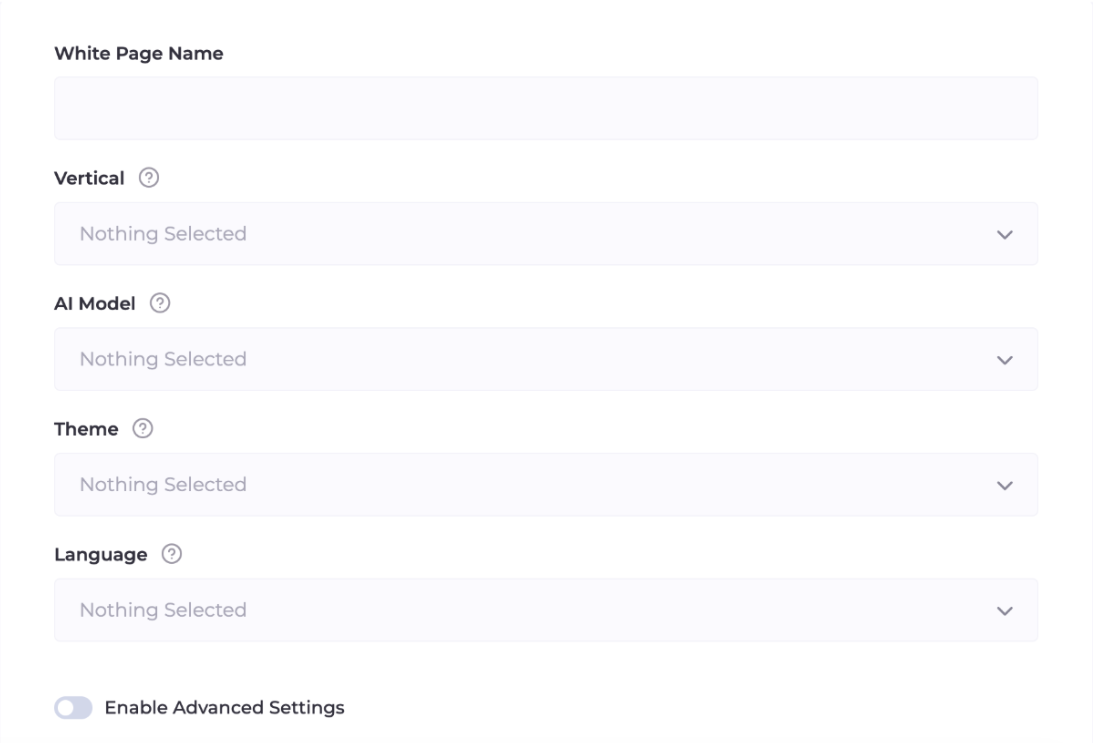
Main fields:
- Vertical: choose your niche, for example Beauty, Finance, or Games.
- AI Model: for TikTok, For Apps (simulates a mobile app landing page) or For Ads (a multi-page site) work best. Both options maximize trust.
- Language: select the language of the target GEO.
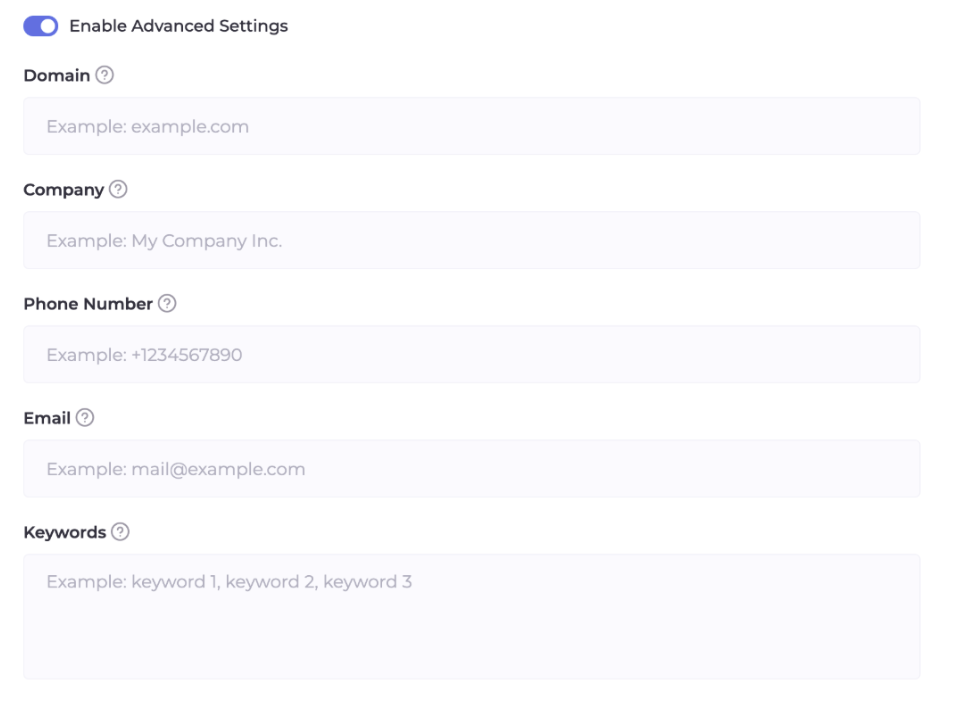
Additional settings:
- Company data: specify the company name and email. The AI will place them in the footer, which helps build trust with TikTok moderators.
- Keywords: add 5-10 words related to your creative.
Click "Generate", upload the archive to the public_html folder on your hosting, and unpack it. Your safe site is ready.
4. Setting up Flow in Cloaking.House
Step 1. Links to the white page and offer
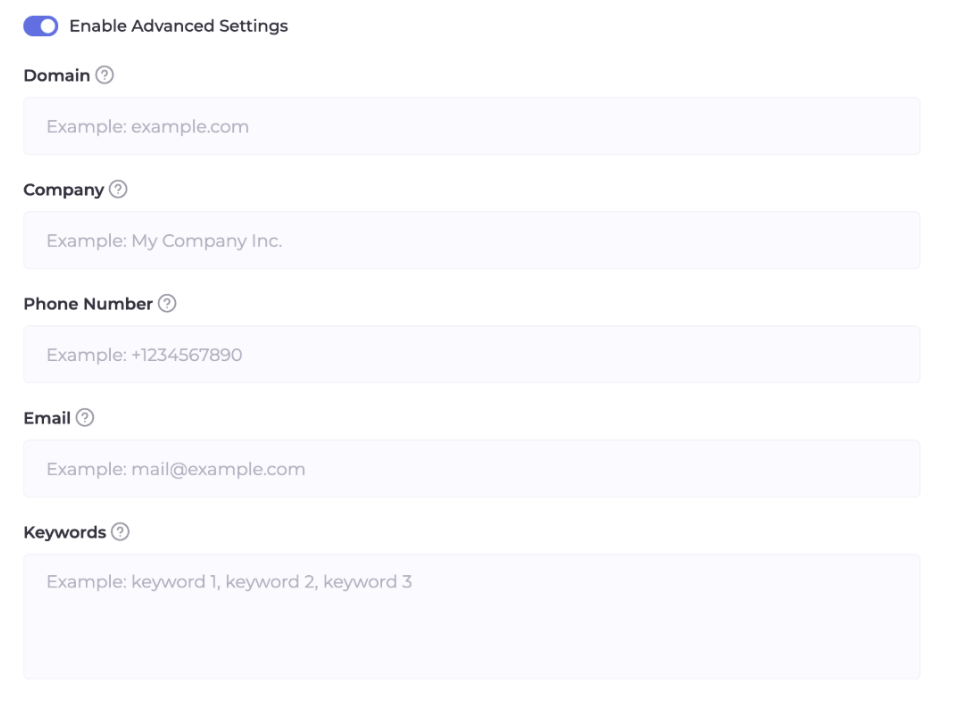
- Flow Name: use a clear name, for example TT_Nutra_IT (TikTok, nutra, Italy).
- White page: specify the file name of your white page (site.php or site.html) and select the "Loading" method. This is the standard approach since the URL in the TikTok browser remains unchanged.
- Offer page: insert the link to the offer. Use "Redirect" for an external URL and "Loading" for a local page.
Step 2. Traffic filtering
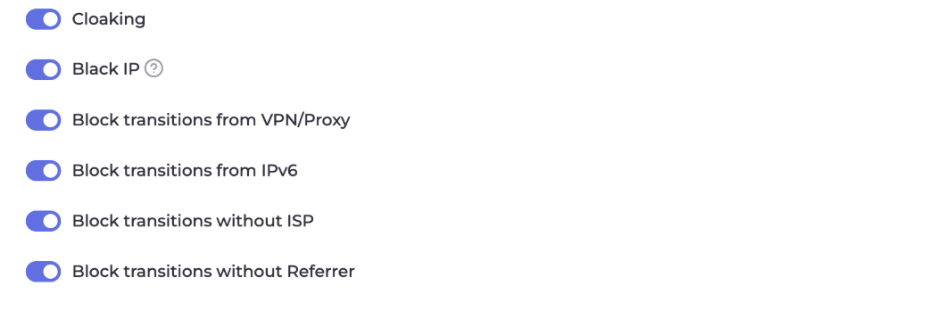
Main protection parameters:
- Cloaking and Black IP: enable both parameters to automatically block known moderator IP address databases.
- VPN/Proxy ban: enable this setting. Regular users rarely use such tools, whereas verification systems use them.
- IPv6 filter: an important setting, as moderators often connect via this protocol. When the filter is enabled, all such visits are directed to the white page.
- ISP filter: cuts off traffic from data centers (Amazon, Google Cloud, and similar) and allows only visitors from real internet service providers.
Targeting and segmentation:
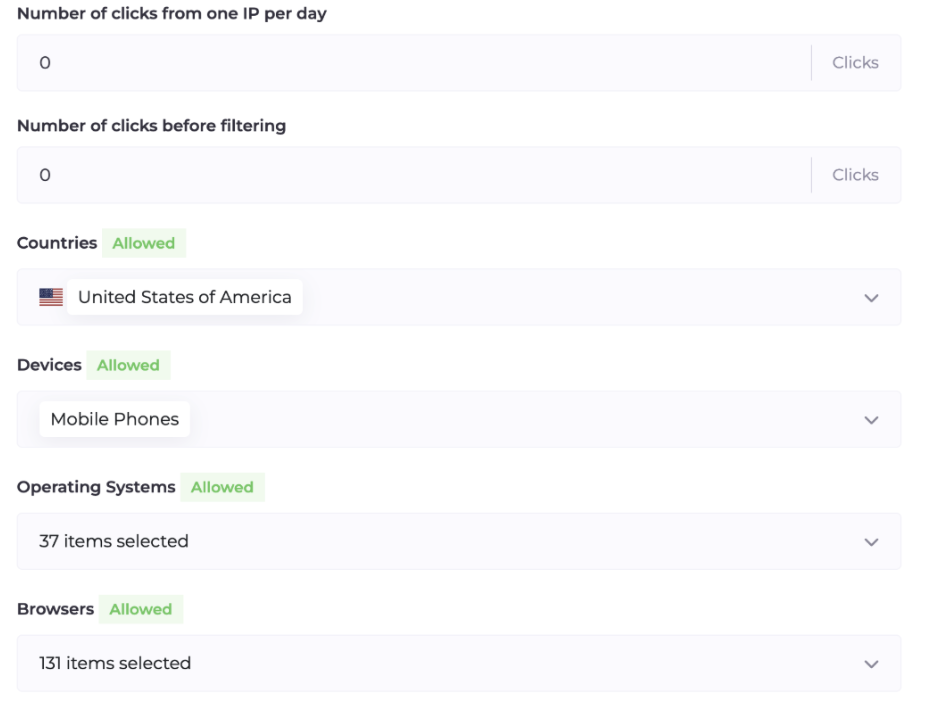
- GEO: open access only for the target country. Visitors from all other regions will only see the white site.
- Devices and OS: if you are targeting Android, block desktops and iOS.
GET parameters
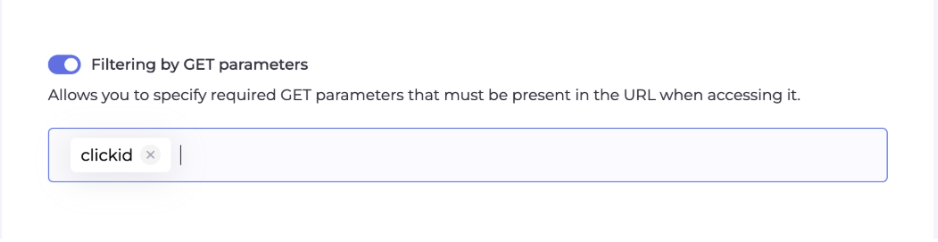
Add another layer of protection with a unique key, such as subid. If someone follows a direct link without this tag, the system will mark the visit as unwanted.
Additional settings:
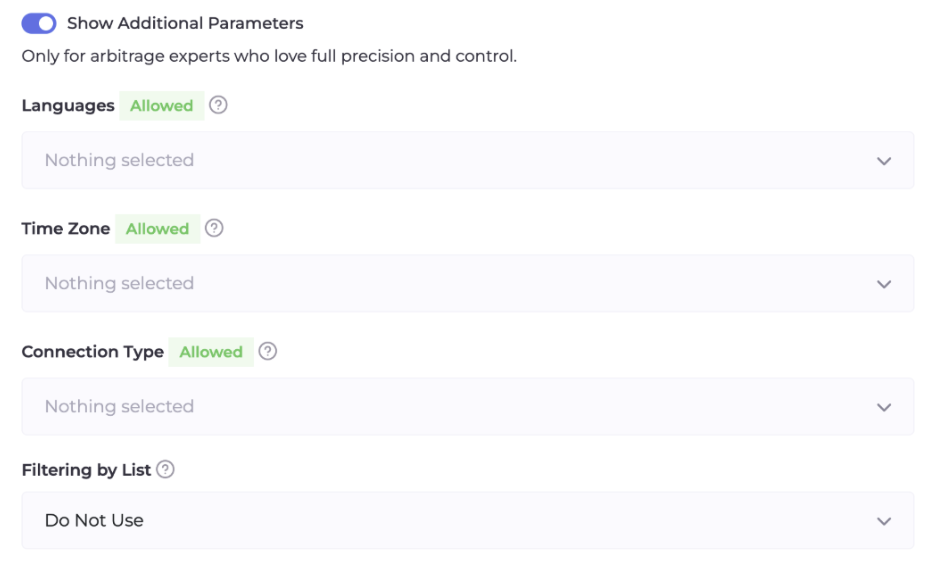
- Languages: filter visitors by browser language. If you are advertising in Germany, and the visitor has English or Chinese set in their browser, they will be directed to the white page.
- Filtering lists: if you have your own database of unwanted IP addresses, connect it in the Black List format.
Step 3. Activation and testing
- Status: set the Flow to "Active".
- White list: add your own IP address to see the offer page during testing.
Step 4. Connecting Flow to the site
- Download the index.php file from your Flow in Cloaking.House.
- Upload it to the root directory of your hosting.
- Rename the white page file from index.html to site.html.
- Now your domain works as a filter: a TikTok moderator lands on the white page, and a real buyer with your tag - on the offer.
5. Warming up and launching the advertising campaign
- White launch: run the campaign for one day on a pure white page (without cloaking or with Flow in the "Paused" status). Budget: $10.
- Moderation: wait until the campaign gets the Approved status.
- Activation: after the first impressions appear on the white page, switch the Flow in Cloaking.House to the "Active" status. From this moment on, your target traffic will be directed to the offer.
6. Analytics in Cloaking.House
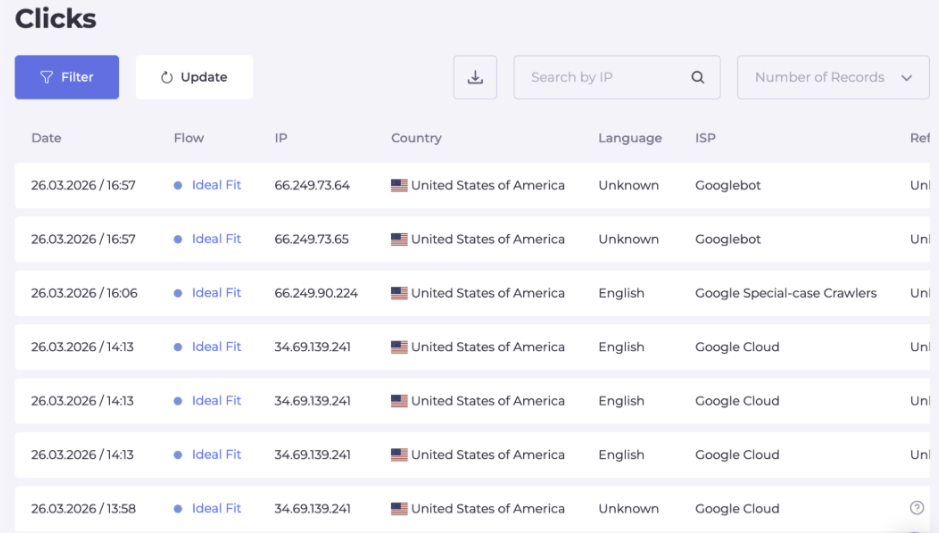
Keep an eye on the "Clicks" tab:
- Cloaking: clicks from countries like Singapore or the US marked as Cloaking mean the protection is working.
- Client: these are your real leads.
- Reason: if real users end up on the white page, check the specified reason. You might need to allow a specific ISP provider or loosen the VPN filter.
Final recommendations for TikTok in 2026
- No redirects: TikTok blocks almost immediately for redirections, so use only Loading (PHP).
- GET tags: always add tags to links (for example, yoursite.com/?tt_id=123). This filters out about 99% of scanning bots.
- Appeals: in TikTok, appeals work better than in Google. If your setup is correct, submit an appeal, as accounts are often restored.
Pricing and welcome bonuses
Start working with additional benefits:
- 7-day trial period: a free week of using Cloaking.House for every new account.
- 50% discount: available when paying for an annual plan.
- Promo code: use promo "blog" to get 3 GB of free traffic from SX.ORG.
Conclusion
TikTok Ads can provide a huge ROI if you know how to work with its unpredictable AI. With high-quality resources, unique creatives, and reliable protection from Cloaking.House, you will be able to pass moderation and consistently drive traffic for a profit.