
What Is Proxy Rotation? IP Changes, Pricing and Choosing a Plan

With a standard proxy connection, requests are sent through the same IP address. Rotation lets you change that address automatically - after a request, at a set interval or whenever you trigger a change.
Rotating proxies are used for collecting public data, monitoring prices, SEO research and testing websites from different locations. Choosing the right setup means considering more than how often the IP changes. Location, session length and traffic costs matter too.
With SX.ORG, you can configure the location and connection settings to suit your task. Frequent IP changes are not always the best option: sometimes, keeping the same address throughout a session is more important.
How Proxy Rotation Works
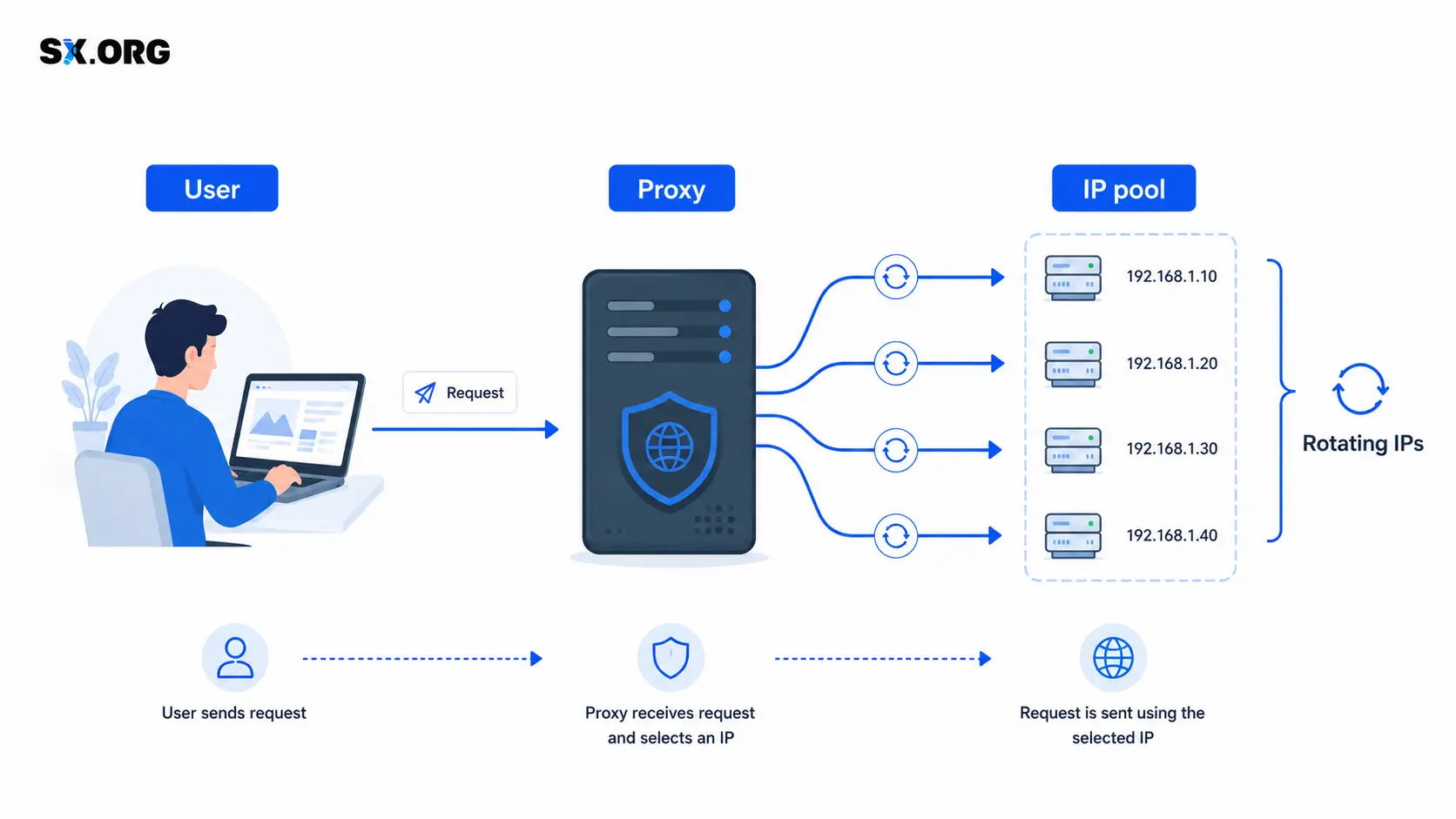
How Proxy Rotation Works
You connect to a proxy server, and the service selects an exit IP from its available pool. This is the address the destination website sees.
Depending on the rotation settings, the process might look like this:
- The first request uses one IP address.
- The next request or a new session receives a different address.
- The IP changes again when the configured interval ends.
You usually do not need to enter a new server address and port each time. The exit IP changes, while your connection details stay the same. The exact behavior depends on the service settings and the application you use.
Rotation helps distribute requests across IP addresses, but it does not guarantee that you will avoid CAPTCHAs or restrictions. Always follow the website’s rules and permitted request limits.
Types of Proxy Rotation
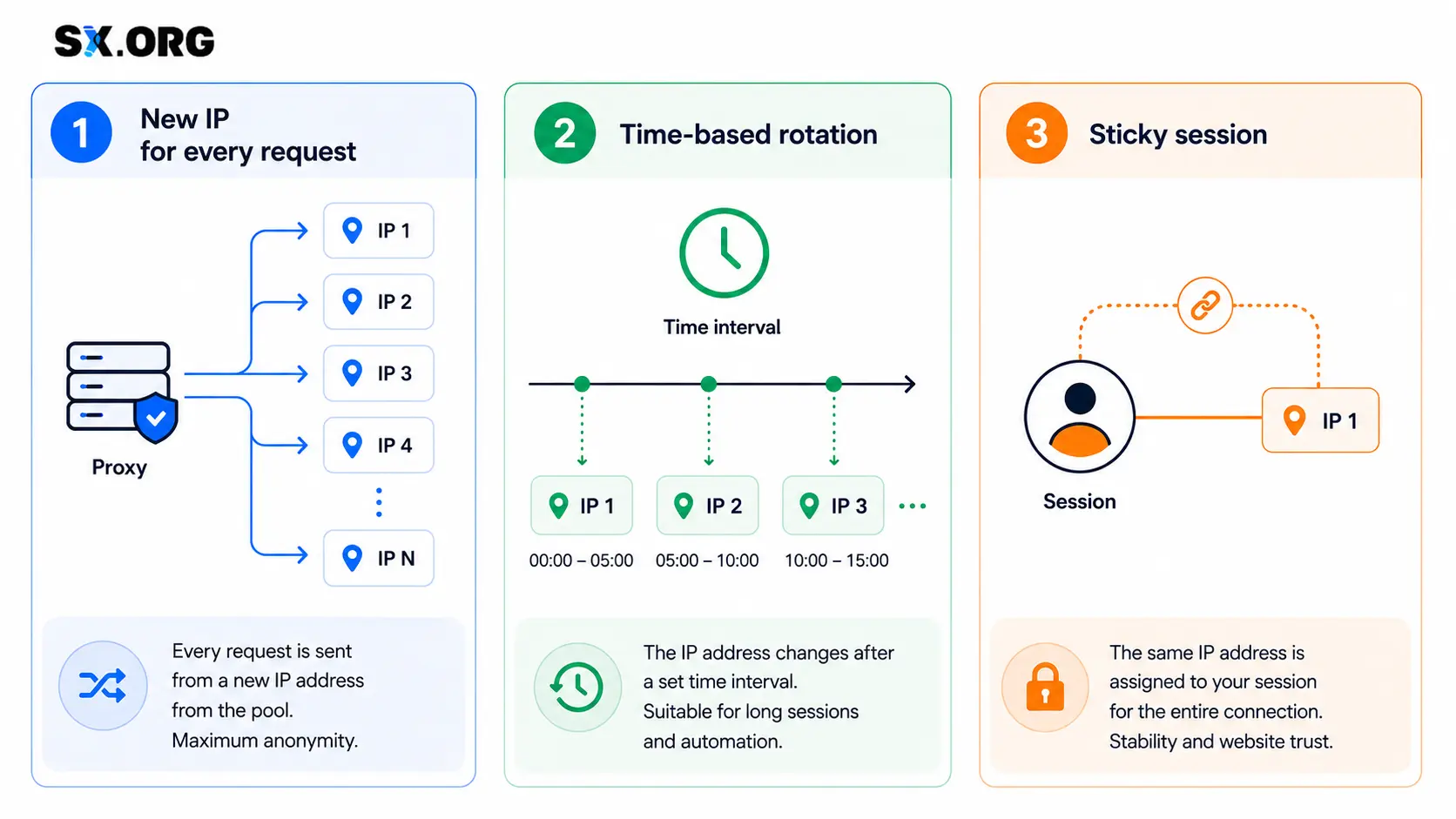
Per-Request Rotation
Each new request uses a different IP address, where supported by the connection.
This can work well for independent tasks such as:
- Collecting public data
- Monitoring prices
- Checking search results
- Processing large numbers of pages
- Running checks that do not require a persistent login
If several actions need to happen within the same user session, changing the IP after every request may disrupt the process.
Time-Based Rotation
The IP changes at a set interval - for example, every minute or every five minutes. These options are described in the SX.ORG FAQ.
This is useful when you need to send several requests through one address before switching to another. Choose the interval based on how long the task takes, rather than assuming that more frequent changes are always better.
On-Demand IP Changes
Some services let you refresh the IP manually or through an API - an interface that allows software to send an IP-change command.
This is useful when you need rotation at a specific point, such as after checking one set of pages and before starting the next.
Sticky Sessions
A sticky session is designed to keep the same IP address while you complete a series of related actions. It can be useful for:
- Filling out a form
- Working with a shopping cart
- Moving between pages
- Testing a customer journey
- Longer browser sessions
Check the provider’s session conditions carefully. “Sticky” does not always mean that the same IP is guaranteed to remain available for the entire period you select.
What Does “Proxy Rotation via URL” Mean?
Proxy rotation via URL usually means changing the IP through a dedicated link. You open the URL or call it from your software and the service receives a command to refresh the address.
Before purchasing this type of connection, check:
- Whether a dedicated IP-change URL is available
- How often you can call it
- How long the change takes
- Whether active connections are interrupted
- Whether the selected country stays the same
- How to confirm that the IP has changed
Do not confuse an IP-change URL with a link for downloading a proxy list. The first triggers an address change; the second simply provides connection details.
If you need to change IPs automatically after a specific action, choose a service with a documented control method, such as a URL, an API or a suitable automatic rotation setting.
When Are Rotating Proxies Useful?
Web Scraping
When collecting public data, rotation helps distribute requests across IP addresses. It does not replace request limits, pauses or error handling.
When choosing a connection, consider the number of pages, response sizes, required country and whether the task needs a persistent session.
Price Monitoring
Rotating proxies can support regular checks of prices, stock availability and product listings.
When comparing regional offers, make sure the required location stays consistent after each IP change. Otherwise, a single report could contain prices from different countries.
SEO Research
Proxies can be used to check search results in different markets. However, the IP address is only one part of a consistent comparison. Query language, device type and search settings matter too.
SX.ORG offers country, city, and ASN targeting. An ASN identifies the network associated with an IP address.
Automation and Testing
Rotation can be used in scripts and tools that perform repeated tasks. For multi-step website tests, keeping the session consistent is often more important than changing the IP after every action.
When Rotation Is Not Needed
Frequent IP changes can get in the way when you need to:
- Stay logged in for an extended period
- Maintain a single user session
- Download a large file
- Complete several connected steps
- Keep a continuous connection open
For these tasks, consider a static IP or a connection mode designed to preserve the address. Do not enable rotation simply because it is available - the setting should fit the task.
How to Rent Rotating Proxies
Renting proxy access usually means paying for a connection over a fixed period or paying for the traffic you use. The word “rental” does not automatically mean the IP is dedicated, static or unlimited.
Before paying, check:
- IP type: mobile, residential or corporate.
- Available countries and more precise location options.
- Rotation method and frequency.
- Session persistence conditions.
- Supported protocols and compatibility with your tool.
- Billing model and plan restrictions.
SX.ORG offers traffic-based billing and unlimited-traffic rentals, including short-term and longer-term options. Its unlimited connections are described separately as an option for tasks that do not require frequent proxy changes.
Check the rotation settings for the specific offer you choose rather than assuming that every plan works the same way.
How to Find Affordable Rotating Proxies
An affordable proxy is not necessarily the one with the lowest listed price. If requests fail repeatedly, your team spends time retrying tasks and collecting missing data.
Compare the total cost of getting the work done:
- How much traffic the task uses
- How many requests succeed
- Whether precise location targeting is necessary
- How frequently the IP needs to change
- How much time is spent troubleshooting
For small or occasional checks, a traffic-based plan may be worth testing. For ongoing, high-volume work, compare that cost with a longer-term rental - but first confirm that the connection settings support your task.
How Much Do SX.ORG Proxies Cost?
With SX.ORG, you can pay for traffic or rent proxies with unlimited traffic. You do not need to pay for a full month to complete a short task: unlimited-traffic residential and corporate proxies are available for $1 per IP per day.
| Billing model | Price | Best suited to |
|---|---|---|
| Traffic-based | $3 per GB for mobile, residential, and corporate proxies | One-off checks and tasks with low or variable data usage |
| Unlimited-traffic residential and corporate proxies | $1 per IP per day | Short tasks, connection testing, and work without tracking every GB |
| More IPs or a longer rental period | Discounts based on the number of IPs and rental duration | Ongoing work, team projects, and scaling |
How to Get Better Value From Your Rental
Start with one IP for one day to test the connection in your tool. If it works well, choose the number of addresses and rental period you need. Discounts are available for larger orders and longer rentals.
This lets you test a proxy without committing to a full month, then choose more cost-effective terms for ongoing work.
Before paying, check the final price, available locations and IP-change settings. Unlimited traffic and rotation are separate features: the connection you choose must support your particular workflow.
“Unlimited Proxies”: What Should You Check?
“Unlimited” can mean several different things:
- No traffic allowance
- No fixed limit on the number of ports
- No stated cap on simultaneous connections
- No expiry date for purchased traffic
These are not interchangeable. Unlimited traffic does not guarantee unlimited speed, permanent availability of every IP or unrestricted use.
SX.ORG lets you create unlimited ports and use multiple connections.
Before purchasing, ask specific questions: “Is there a traffic limit?”, “Which rotation modes are supported?” or “Can the connection handle the number of simultaneous requests I need?”
These questions are more useful than relying on the word “unlimited” alone.
How to Check That Rotation Works
Once you have configured the proxy:
- Connect it to the tool you plan to use.
- Open an IP-checking service and record the visible address.
- Wait for the rotation interval or trigger an IP change.
- Check the IP again.
- Confirm that the address changed and the required country stayed the same.
- Test the connection in your actual workflow.
For a sticky session, do the opposite: confirm that the address stays consistent throughout the required process and that the connection remains usable.
If the IP does not change, first check the rotation settings and whether your application creates a new connection. Do not judge the setup based only on one open browser tab.
Frequently Asked Questions
Can I Change a Proxy IP Using a Link?
Yes, if the provider offers a dedicated IP-change URL. Before purchasing, confirm that the feature is available, check the minimum interval between calls and ask what happens to active connections during rotation.
Should I Use Per-Request or Time-Based Rotation?
Per-request rotation can suit independent requests. If several actions need to stay connected, a time interval or a session that preserves the IP may be more appropriate.
Can I Rent Rotating Proxies With Unlimited Traffic?
Check both conditions separately: whether traffic is unlimited and whether the connection supports the rotation mode you need. An unlimited plan does not automatically include frequent IP changes.
With SX.ORG, review the conditions of the specific connection before choosing it.
How Can I Find Affordable Rotating Proxies?
Start with a small test and measure traffic usage and successful requests. Then compare the cost per GB with a rental plan that supports your task. For regular work, also check the discounts available for more IPs and longer rental periods.
Does Rotation Prevent Blocks?
No. Websites may consider request frequency, user behavior, login details and other signals. Rotation is a connection setting - not permission to bypass a service’s rules.
Key Takeaways
Proxy rotation changes your exit IP and lets you control how long an address is used. Independent checks may benefit from frequent changes, while connected actions usually need a more stable session.
When choosing a connection from SX.ORG compare rotation settings, location, traffic costs and restrictions - not just the price. Run a small test in your own tool before increasing the workload.