
Top 5 New Anti-Detect Browsers: Alternatives to Established Tools
New anti-detect browsers offer more than fingerprint customization. Developers are adding automation, team tools, AI-assisted controls and more convenient proxy management. But which of these features actually make a difference in day-to-day work?
At SX.ORG, we’ve selected five options worth a closer look: Anonym Browser, Aurorium, MostMate, NexBrowser and P1Browser. In this overview, we’ll explore their key features and explain what to check before getting started.
Anti-Detect Browser Comparison: Key Features
Here’s a quick comparison to help you decide which product to explore further.
| Anti-detect browser | Key features to explore | Use cases to consider |
|---|---|---|
| Anonym Browser | AI control through MCP, team workspaces, bulk actions, and a built-in proxy checker | Managing a large number of profiles and a team |
| Aurorium | AI-based fingerprint generation, a built-in messenger, a mobile app for team communication, bulk profile creation and API. | Team collaboration and managing a large number of accounts |
| MostMate | Bulk profile management, window synchronization, RPA and AI-assisted workflow creation | Repeating actions across multiple profiles and automating workflows |
| NexBrowser | Proxy management, a local API and RPA; currently Windows-only, with macOS support in development | Managing profiles through scripts and automated workflows |
| P1Browser | Isolated profiles, team access permissions, an API and window synchronization | Working with online stores, social media accounts and advertising accounts |
Anonym Browser: An Anti-Detect Browser with AI Control
Anonym Browser is an anti-detect browser for managing multiple accounts. It combines browser profiles, team workspaces, bulk actions and a built-in proxy checker. The product is currently in open beta and available for Windows, macOS and Linux.
What Sets Anonym Browser Apart
The main feature is a built-in local MCP server that lets you fully control Anonym Browser with AI in plain language. AI can not only create profiles, assign proxies and manage the application itself, but also perform tasks directly inside running browser profiles: for example, open Facebook and register an account.
All of this works without connecting additional automation tools.
MCP is free during the beta.
Convenient Integration with SX.ORG
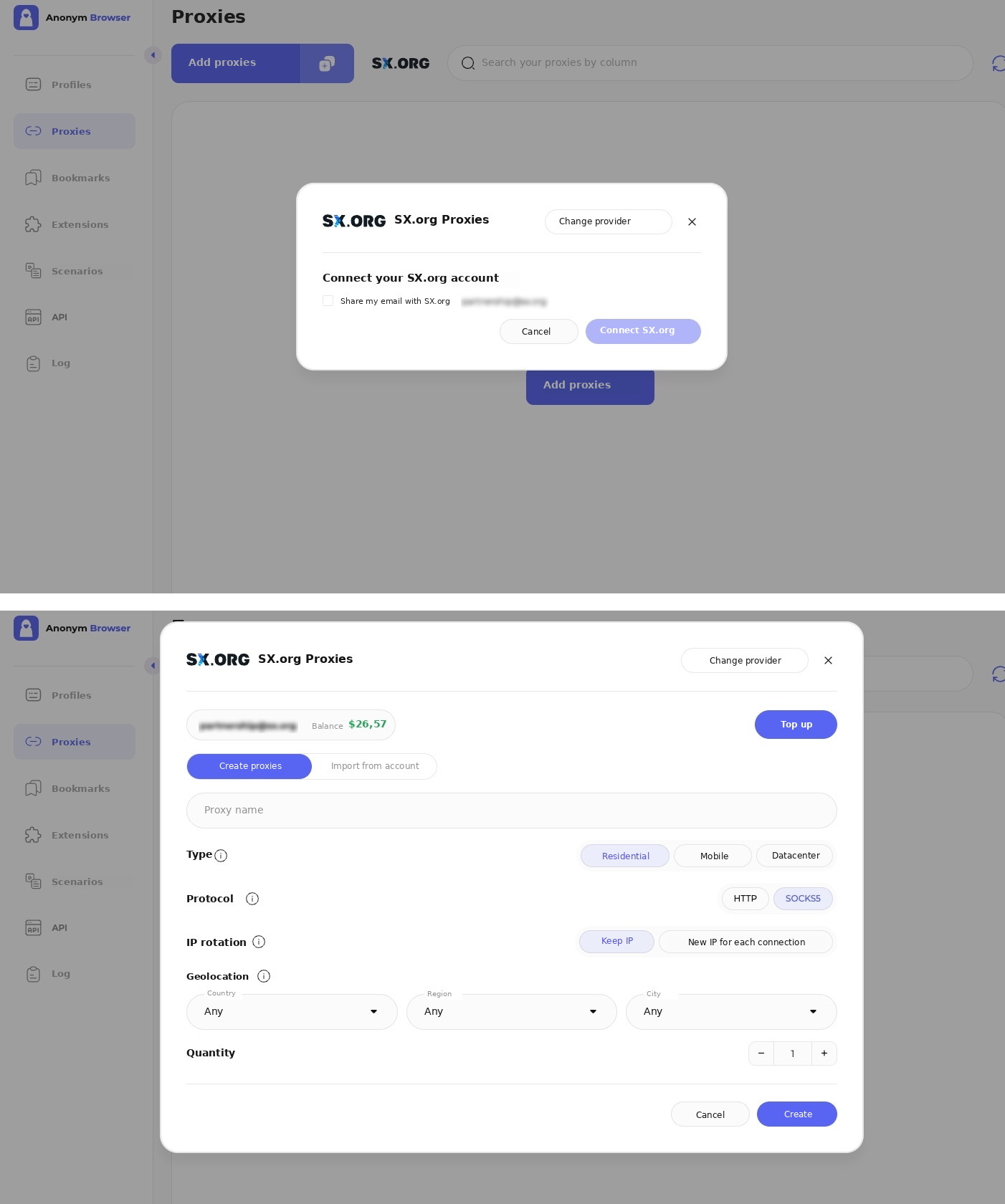
Anonym Browser integrates with SX.ORG through an API. You can connect and manage proxies directly in the browser interface instead of switching between dashboards. For anyone building a workspace from scratch, this simplifies profile setup: profiles and proxies are in the same place.
Who Should Consider It?
Anonym Browser is worth considering for professionals and teams that manage many profiles and want to separate workspaces and employee permissions. During the beta, a free Beta-test plan is available: up to 500 profiles and up to 10 team members. For a first test, create a few profiles, connect proxies through the integration, and try giving MCP a simple task.
Aurorium: An Antidetect Browser with AI Fingerprint Generation and Team Features
Aurorium Browser builds a workspace around browser profiles. Besides environment setup, the antidetect browser offers a built-in messenger, a mobile app for team communication, bulk profile creation, a cookie synchronizer and API. This approach is useful when you need more than a single profile and want to organize the work of several team members.
One standout feature is Aurorium Fingerprint. It is a self-learning AI model that generates realistic digital fingerprints based on a database of real devices, geolocation and many interrelated factors. When creating a fingerprint, you can take into account parameters you set, such as GEO, age or occupation.
What Sets Aurorium Apart
In team work, communication often moves to third-party messengers. Aurorium lets you chat right inside the browser: the built-in messenger is used for talking to colleagues and the global chat helps you find any registered user. The mobile app lets you stay in touch with your team even when you're away from your computer.
For scaling, there are bulk profile creation, a cookie synchronizer and API. They help you prepare environments faster and connect the browser to your workflows.
We'd test it on a specific team scenario: create several profiles, give an employee access, discuss a work question in the built-in messenger and see how the mobile app works. This will show how well these features fit your team.
Make the Workspace Your Own
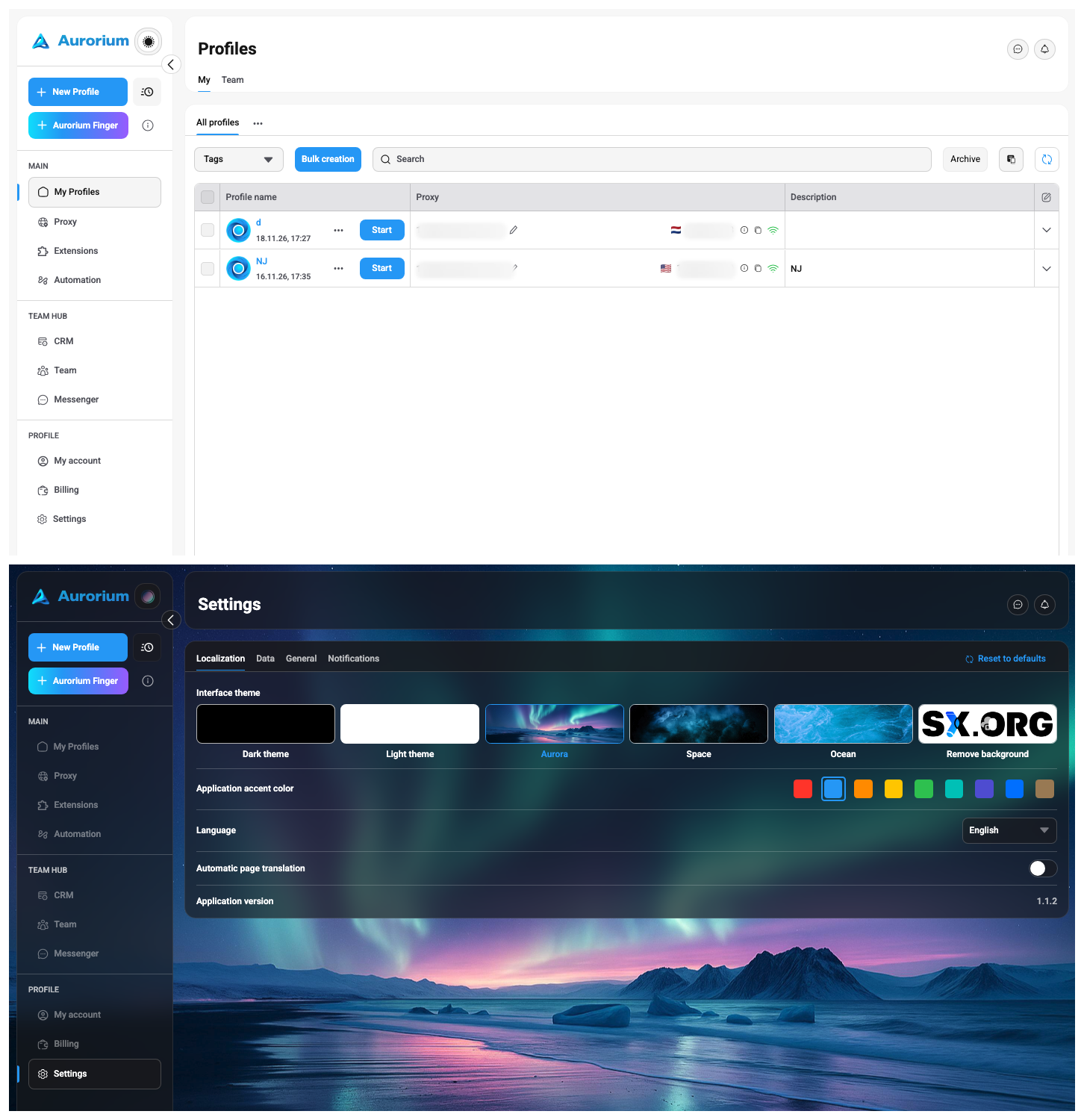
Aurorium has an appealing interface with customizable styling. In addition to the standard light and dark themes, you can choose from the available backgrounds or upload your own image. It’s a small but welcome touch for a workspace where you spend a lot of time.
Who Should Consider It?
Aurorium is worth considering for teams that need more than separate browser profiles and want more convenient communication and coordination.
During testing, pay attention to permission management, the team workspace, the messenger and the mobile app. It's best to evaluate Aurorium Fingerprint separately — by how much it simplifies preparing profiles for your workflows, not by the mere mention of AI in the product description.
MostMate: Account Management and Automation Tools
MostMate is an anti-detect browser for managing multiple accounts. It combines isolated environments, bulk profile management, window synchronization, team permissions and a local API.
Its main appeal lies in combining everyday operations with automation tools. It’s an option for users who want not only to keep accounts separate, but also to spend less time on repetitive actions.
What Sets MostMate Apart
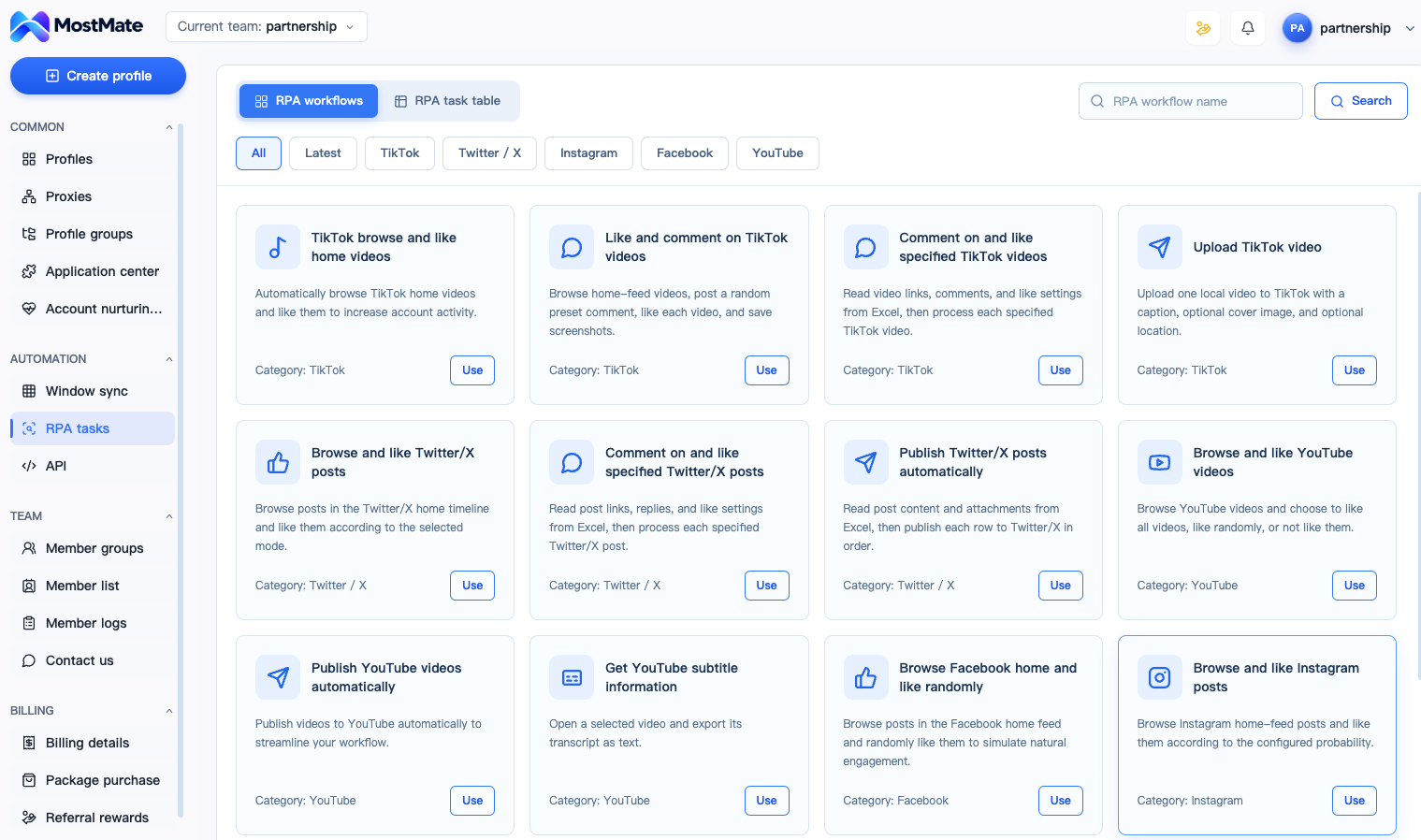
MostMate offers several approaches to automation. The first is window synchronization, which lets you control multiple browser environments at once. To use it, open at least two browser environments and select the windows you want to synchronize. This approach is worth trying if you regularly repeat the same actions across multiple profiles.
The second is a broad selection of RPA workflows. RPA or robotic process automation, automates actions in the interface: instead of manually repeating the same sequence, you select and configure a workflow to run.
According to the developer, AI can also assist with workflow creation. You describe a task in plain language, then review and edit the resulting sequence of actions before running it.
When evaluating the browser, compare both approaches: which tasks are easier with synchronized windows and which are better suited to a dedicated workflow?
Who Should Consider It?
MostMate may appeal to professionals and teams that perform many similar operations across profiles and accounts. Window synchronization and RPA let you choose an automation method that suits a particular process.
For your first test, pick a short, familiar task. Try completing it using synchronization or a suitable RPA workflow and check how easy it is to understand the setup, results, and any errors. Run your initial experiments on test profiles before introducing automation into your main workflow.
NexBrowser: An Anti-Detect Browser with an API, RPA and Proxy Management
NexBrowser combines isolated browser profiles, fingerprint customization, window synchronization, and bulk operations. It is currently available only for Windows 10/11, 64-bit, with a macOS version in development.
What Sets NexBrowser Apart
Automation options include RPA workflows and a local API with support for Selenium, Puppeteer and Playwright. You can build sequences of actions without coding or connect profiles to your own scripts.
Who Should Consider It?
NexBrowser is worth considering for Windows users who want profiles and automation tools in one workspace. For an initial test, a short sequence is enough: create a profile, assign a proxy and complete a familiar task through RPA or the API. This will help you assess the setup process before moving your main workflows over.
P1Browser: A Browser for Multiple Accounts and Team Projects
P1Browser is designed for managing multiple accounts in e-commerce, social media and advertising. Each profile can have its own browser environment, fingerprint parameters and proxy. Team collaboration features include employee accounts and configurable access permissions.
What Sets P1Browser Apart
P1Browser combines profile management with tools for repetitive operations. Window synchronization lets you work across multiple environments at once, while the API allows you to connect the browser to your own systems and automate profile creation and launches.
You can add proxies manually or choose them through a built-in section featuring proxy providers. Purchased connections automatically appear in the proxy list, where you can assign them to the appropriate environment.
Who Should Consider It?
P1Browser is worth considering for professionals and teams managing multiple stores, advertising accounts or client projects. During testing, check how easy it is to organize profiles, assign proxies, and manage employee permissions. If you plan to automate your work, test window synchronization and the API on a task from your own workflow.
How to Choose an Anti-Detect Browser for Your Workflow
A feature list can help narrow down your options, but it’s best to make the final decision after a small-scale test. Don’t move your entire operation over straight away: start with a few test profiles.
Follow the same process in each browser you’re considering:
- Create a profile. Check whether the main settings are clear and how much manual setup is required.
- Connect a proxy. Test adding a single connection, importing a list or using an available provider integration.
- Complete a familiar task. Choose a short process that reflects why you’re considering the tool.
- Restart the profile. Check that the cookies, site data and settings you need are retained, provided automatic clearing is disabled.
- Test team features if you work with others. Review which profiles and actions each team member can access.
- Try the automation you need. If you plan to use an API, RPA or window synchronization, test your workflow before moving your main projects over.
Use comparable tasks and connection conditions across browsers. This makes it easier to identify which interface feels more convenient and where you actually save manual effort.
Proxies for Anti-Detect Browsers: What to Check
Proxy management is an important part of choosing a browser. Adding connections manually may be sufficient for a few profiles. As your projects grow, bulk import, connection checks, and direct provider integrations become more useful.
For example, Anonym Browser lets you connect and manage SX.ORG proxies through a built-in integration without switching between services. In addition, before launching a profile, the browser checks its proxy and won’t start the profile if the proxy isn’t working. NexBrowser also provides proxy management and bulk import.
Before choosing a connection, determine:
- Which country, city, or network with a specific ASN your project requires.
- Whether you need to retain the same IP throughout a session and between launches.
- Whether rotation is required and exactly when the address should change.
- How much traffic you expect to use.
- Which protocols the browser supports and how easy it is to add or replace connections.
SX.ORG offers mobile, residential, and corporate proxies, with targeting by country, city, and ASN. You can choose a connection for your task and then test it in your preferred browser.
After connecting, check more than the IP change itself: verify geolocation, time zone, WebRTC, DNS, and connection stability. For long sessions, check how long the IP remains unchanged and what happens after a profile restart or a dropped connection. If you need to change addresses, assess how the selected rotation mode fits your workflow. Profile data persistence and IP behavior are two separate things to test.
External checkers show the technical configuration, but they cannot guarantee a platform’s decision about a specific account.
Which Anti-Detect Browser Should You Try First?
Start with the task you want to simplify:
- Anonym Browser: AI-driven browser control through MCP, team workspaces, and managing a large number of profiles.
- Aurorium: team collaboration, in-browser communication, bulk profile creation and AI-based fingerprint generation.
- MostMate: repetitive operations, window synchronization, and AI-assisted RPA workflow creation.
- NexBrowser: connecting profiles to your own scripts and automating tasks through an API and RPA; currently available only for Windows.
- P1Browser: organizing team workflows around profiles for online stores, social media, and advertising projects.
Begin with one familiar task. Create a few test environments, connect proxies, and work through your usual process, from setting up the profile to saving the result.
You can find a suitable proxy connection for your chosen browser at SX.ORG.
Frequently Asked Questions
Can I Manage SX.ORG Proxies Directly in an Anti-Detect Browser?
Yes. Anonym Browser integrates with SX.ORG through an API, letting you connect and manage proxies directly within the browser interface, without switching between services.
Are There Any Free Anti-Detect Browsers in This List?
Yes. Some of the products offer free access so you can explore their features. For example, during its open beta, Anonym Browser offers a free Beta-test plan: up to 500 profiles, up to 10 team members, and all current features. After the product’s release, this plan will be replaced by public pricing. Aurorium has an entry-level plan with five profiles, and NexBrowser provides free browser environments after registration. Terms vary, so check the number of available profiles, feature restrictions, and any time limits before getting started.
For ongoing work involving large numbers of accounts, a team, and advanced automation, we recommend considering paid plans. Choose a plan that fits your needs: a paid subscription doesn’t necessarily unlock every feature, and a free option may be enough for a small project.
Who Is Anonym Browser Best Suited For?
Anonym Browser is worth considering for professionals and teams that manage many profiles, want to separate workspaces and employee permissions, and plan to move from bulk actions to AI-driven control.
What Is MCP in Anonym Browser?
MCP is a way to connect an AI tool to the browser. According to the developer, the built-in local MCP server lets you control Anonym Browser in plain language, for example by creating profiles and assigning proxies to them. MCP is free during the beta.
Is Aurorium Suitable for Teamwork?
Aurorium is worth considering if, besides browser profiles, you need tools for communication and team coordination. The product includes a built-in messenger, the ability to create teams and subdivisions and a mobile app for staying in touch with colleagues. During testing, check how convenient it is to distribute access and communicate within the team.
What Can You Automate with MostMate?
MostMate offers window synchronization and RPA workflows for repetitive actions. Synchronization lets you control several selected environments at once, while RPA runs a prepared sequence of steps. According to the developer, AI can help create workflows from a text description of the task. You can review and edit them before running them.
Does an Anti-Detect Browser Guarantee That Accounts Won’t Be Blocked?
No. Profile isolation and fingerprint customization do not override platform rules or guarantee that an account will remain active. Use the browser only for accounts you are authorized to manage, follow each service’s requirements, and test new settings on test profiles first.