
Why Expensive Facebook Setups Get Hit with a Checkpoint on First Login
You buy a high-quality farmed setup for $$35–$$40 with solid aging, manual warm-up and linked autoregs, carefully import it into your antidetect browser, hit "Log In"- and immediately get slapped with a selfie checkpoint or an Advertising Access Restriction. Sound familiar?
When an account costs a couple of dollars, a ban is just the cost of doing business. But when a full-fledged King setup with a Business Manager and eight personal ad accounts dies right out of the gate, it directly eats into your ROI. Yet in 90% of cases, the issue isn't the quality of the farming itself it's how you connect to the account. Meta's anti-fraud system has long learned to detect the slightest mismatch between hardware fingerprints, session history and network environment.
Below is a technical breakdown of why expensive assets burn on first login, along with a step-by-step workflow for building a bulletproof "account + proxy" setup so you can launch campaigns without unnecessary losses.
1. Four Technical Reasons Anti-Fraud Flags Your Setup at Login
To stop guessing why an account gets sent to verification, look at the login process through the eyes of Meta's anti-fraud algorithms:
- GEO and Network Type Conflict. Imagine an account was manually farmed for 14 days using Ukrainian or US mobile data and right after purchase, you log in from a Datacenter IP or a completely different country. To Facebook's security systems, this screams account takeover a real user cannot physically jump from Kyiv to Amsterdam in one second while switching from a mobile carrier to a server rack.
- "Dirty" IPs with Low Trust Scores. Cheap proxies from public pools are used by the thousands for mass account creation and spam. These subnets already have ruined trust scores and sit on multiple blacklists. Even an impeccably farmed profile will trigger suspicious activity flags the moment it touches a burned IP.
- Broken Sessions and Sudden ASN Jumps. If your proxy is set to aggressive rotation (e.g., changing IPs every 1–5 minutes or on every request) and your address switches to a different Internet Service Provider (ASN) while cookies are loading, the session fractures. Anti-fraud detects the network anomaly and locks down ad tools.
- Timezone and WebRTC Leaks. Even with a clean proxy, your profile can leak its real system time or local IP via WebRTC if your antidetect browser environment isn't properly synced.
2. The Foundation: How to Choose Reliable Accounts and Keep Your Warranty
Not even the cleanest proxy can save an account that was slapped together using cheap automated scripts. When sourcing assets for stable media buying, look for three non-negotiables:
- Genuine manual farming (7 to 14 days of real off-Facebook activity to build an organic cookie profile).
- Clean security bindings (an active email, no leftover third-party phone numbers that might get revoked and pre-configured Two-Factor Authentication - 2FA).
- A complete session transfer kit: login, password, 2FA key, token, email credentials, cookies and the original User-Agent used during farming.
A great example of a storefront that meets all these standards out of the box is 3kota.shop. Their workflow is super convenient: you can browse the entire catalog and check live stock right on their website without signing up, while actual purchases and instant archive delivery happen seamlessly through their Telegram bot @shop_3kota_bot.
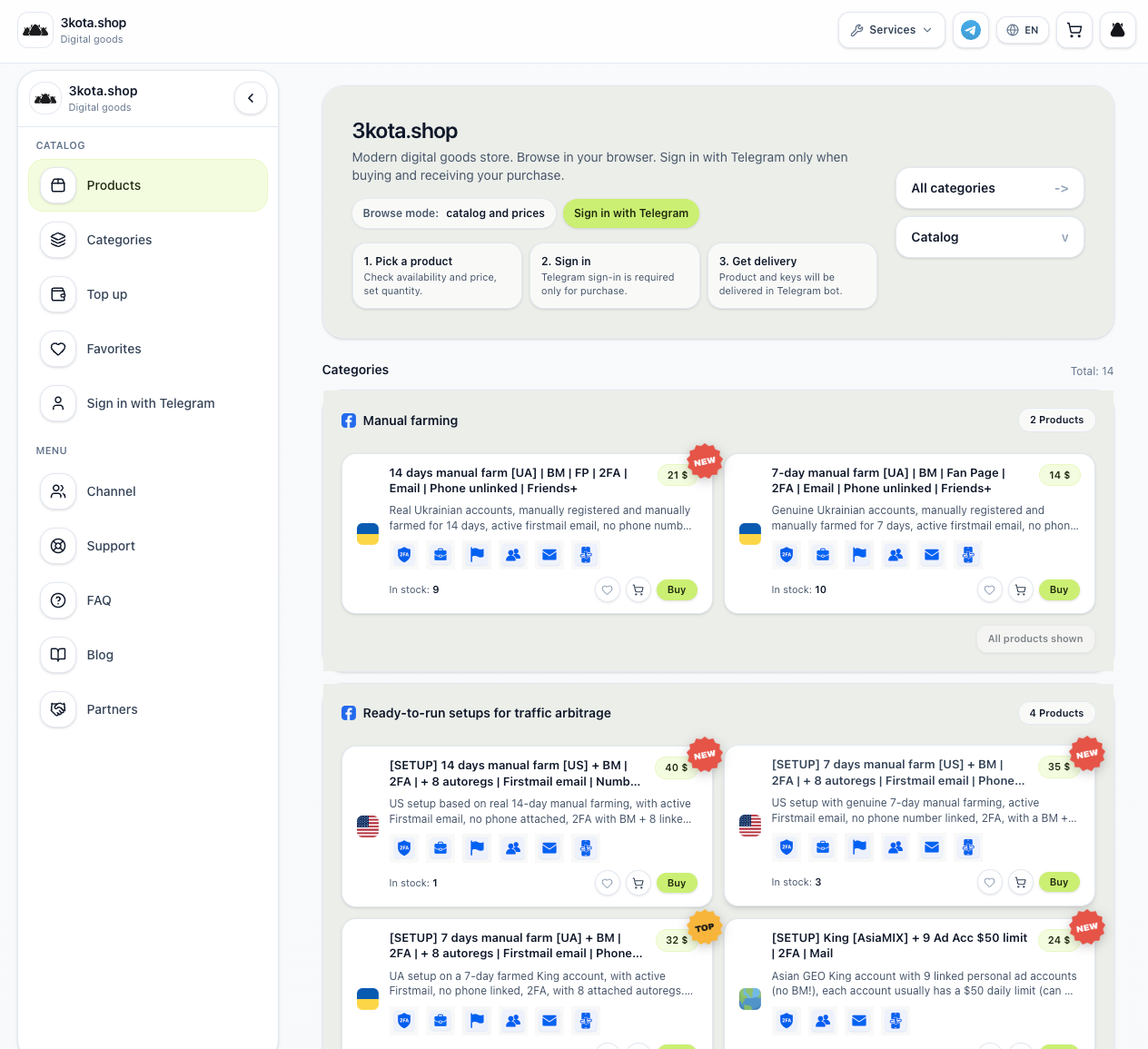
Looking at their product lineup, they cover virtually every core setup needed for Facebook Ads:
- Manual Farming: Ukrainian accounts with 7 or 14 days of manual warm-up, pre-created Fan Pages, Business Managers, 2FA and clean email access $14–$21.
- Ready-to-Run Setups: High-trust King accounts (US, UA or AsiaMIX) bundled with 8–9 linked autoregs or personal ad accounts featuring $50 daily spend limits $24–$40.
- Verified Business Managers: Verified BMs with a $50 daily limitand a ready to useadaccount $19.
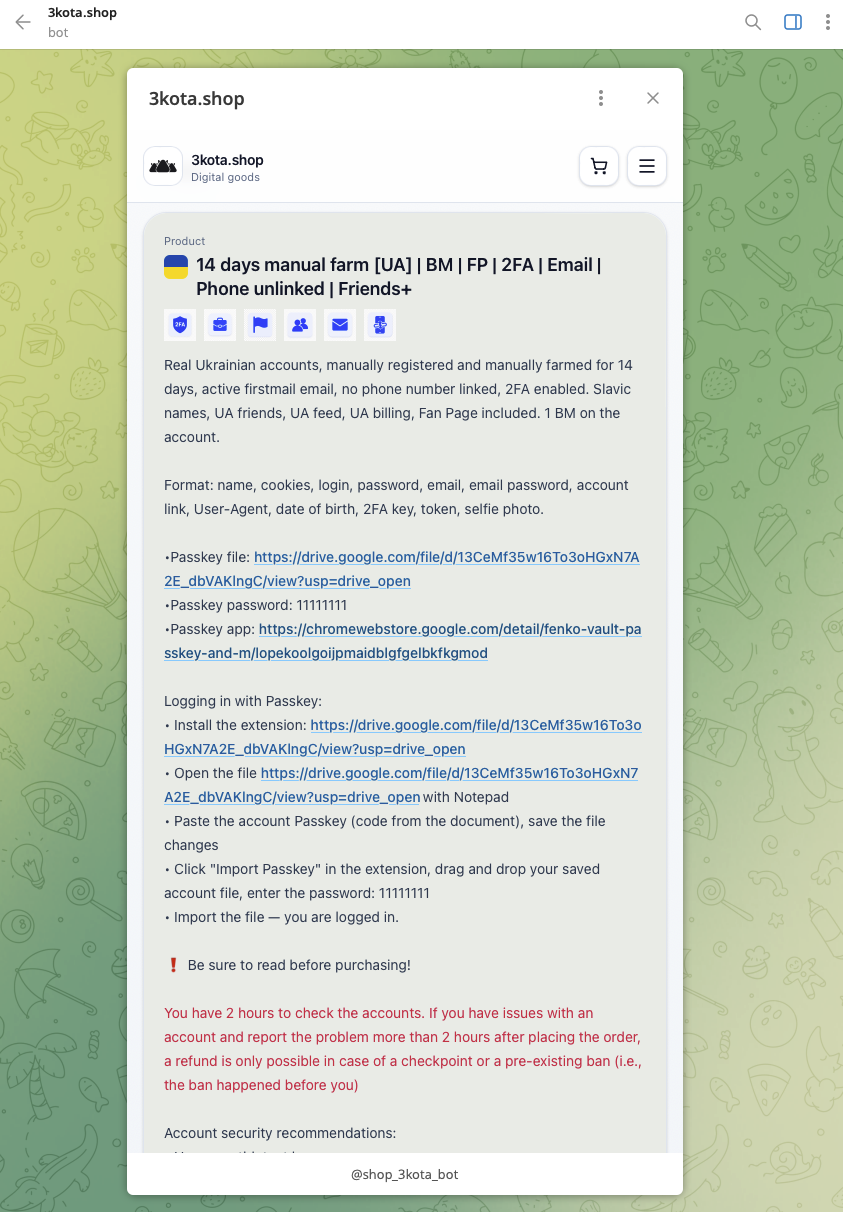
Critical Warranty Note: Pay close attention to the red warning in the product card shown above. You have exactly 2 hours from the time of purchase to inspect the account. Furthermore, the shop's terms explicitly state that if a buyer violates basic login recommendations (most notably logging in with a mismatched GEO or dirty proxy), the store reserves the right to deny a replacement or refund;
That is why you must configure your proxy before hitting "Buy" in the bot.
3. Selecting and Configuring the Right Proxy for Your Setup
Let's say you are picking up a Ukrainian or US manual farm setup. Your goal is to make your login look to Meta's servers like the natural continuation of an existing user session from the exact same device and region.
Let's walk through the setup step by step using SX.ORG, which offers clean mobile and residential proxy pools with flexible pay-as-you-go traffic pricing starting at $3/GB or unlimited ports starting at $5/month for residential and $15/month for mobile.
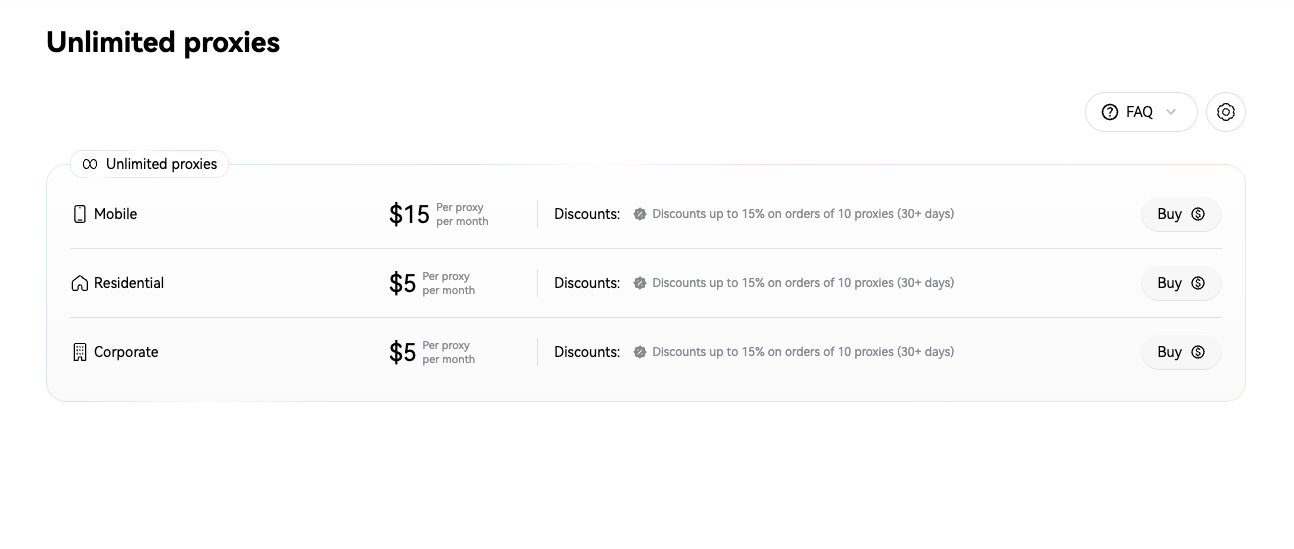
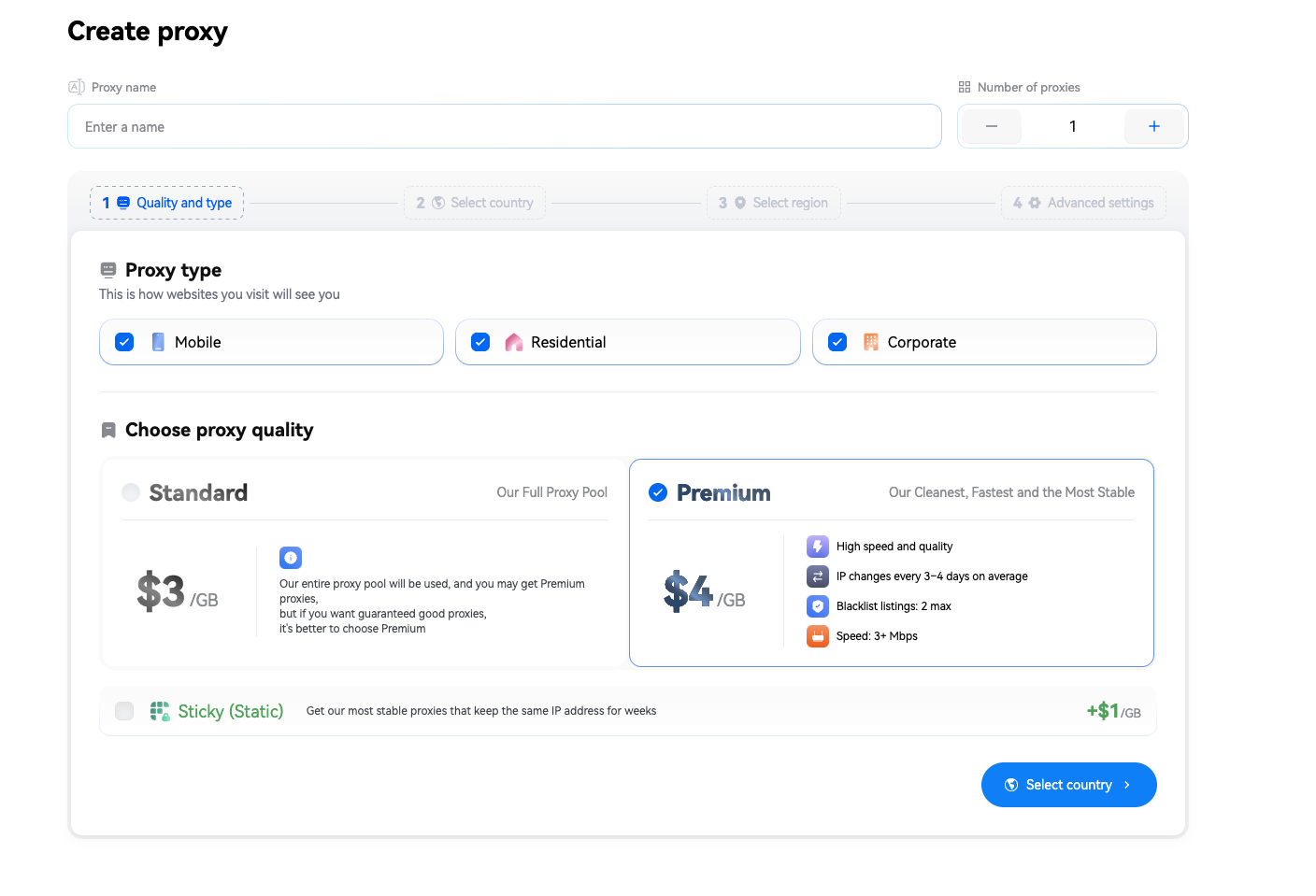
Step 1: Choose the Proxy Type and Quality Tier
Forget datacenter IPs when running Facebook Ads- stick strictly to Mobile or Residential proxies. When working with $30–$40 setups, go straight for the Premium tier: it filters for the fastest, cleanest IPs (no more than 2 blacklist entries across databases) that hold a single IP address for 3–4 days on average without drops.
Step 2: Match the Account's GEO Down to the Region
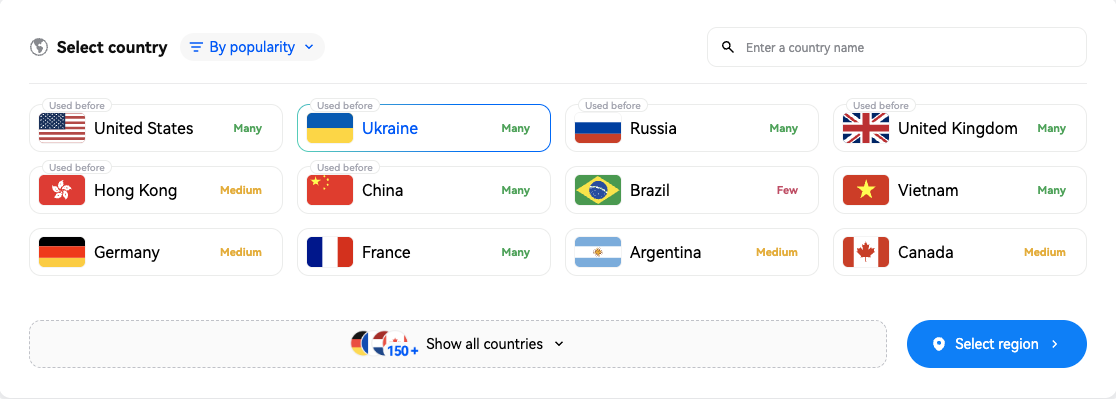
If you grabbed a Ukrainian farmed setup from 3kota.shop, select Ukraine in your proxy settings. If needed, you can narrow your targeting down to a specific region or city (such as Kyiv City) and even lock in a specific mobile carrier (ASN) if one is listed in your account logs. For US setups, follow the exact same logic by matching the country and state.
Step 3: Configure IP Rotation Rules (The Most Important Setting)
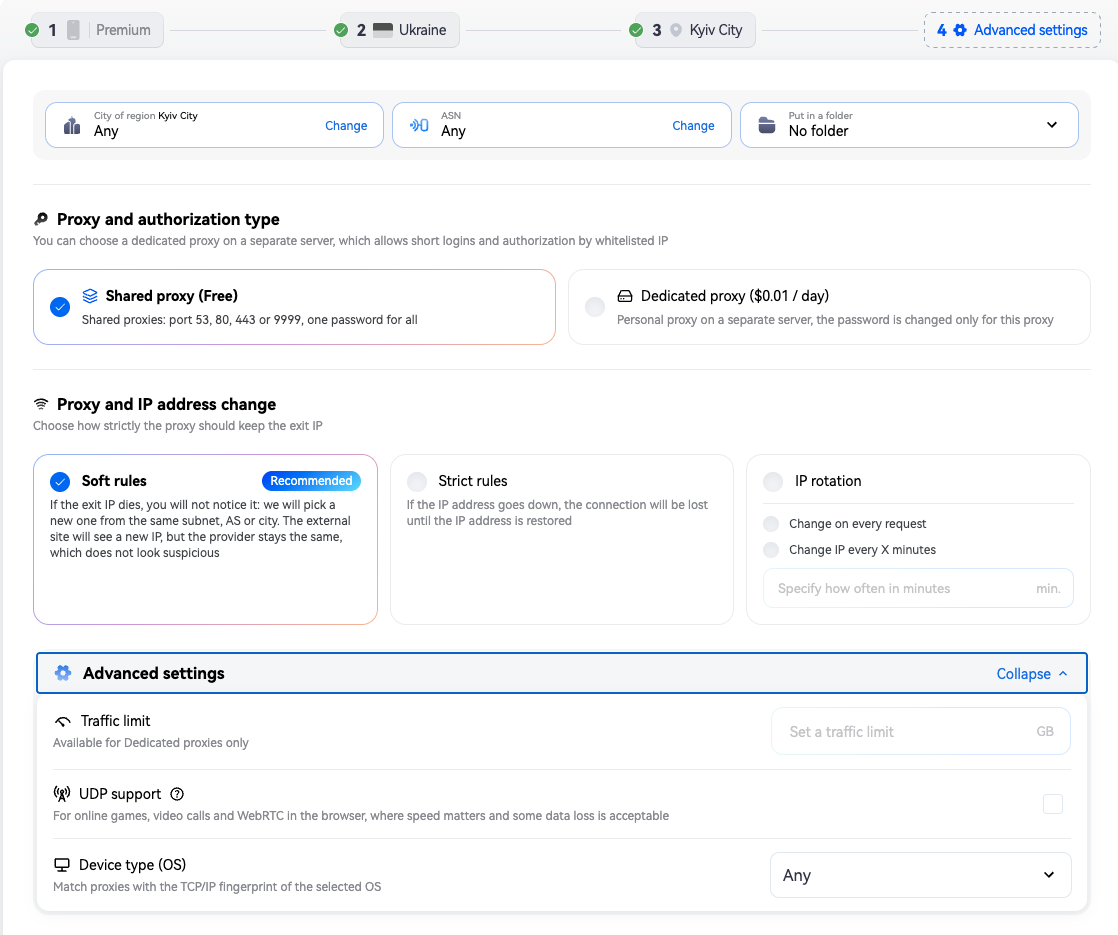
To ensure you don't get booted mid-session while checking Business Managers or binding a payment method, keep "Soft Rules" enabled under the IP rotation settings.
Here is how it works in practice: as long as your initial mobile IP stays online, you remain locked to that exact address with zero sudden jumps. If the carrier gateway resets, the system automatically assigns a new IP from the exact same subnet, the same carrier (ASN) and the same city. To Facebook's anti-fraud system, this looks just like a smartphone naturally switching to a neighboring cell tower-zero suspicion and no checkpoints.
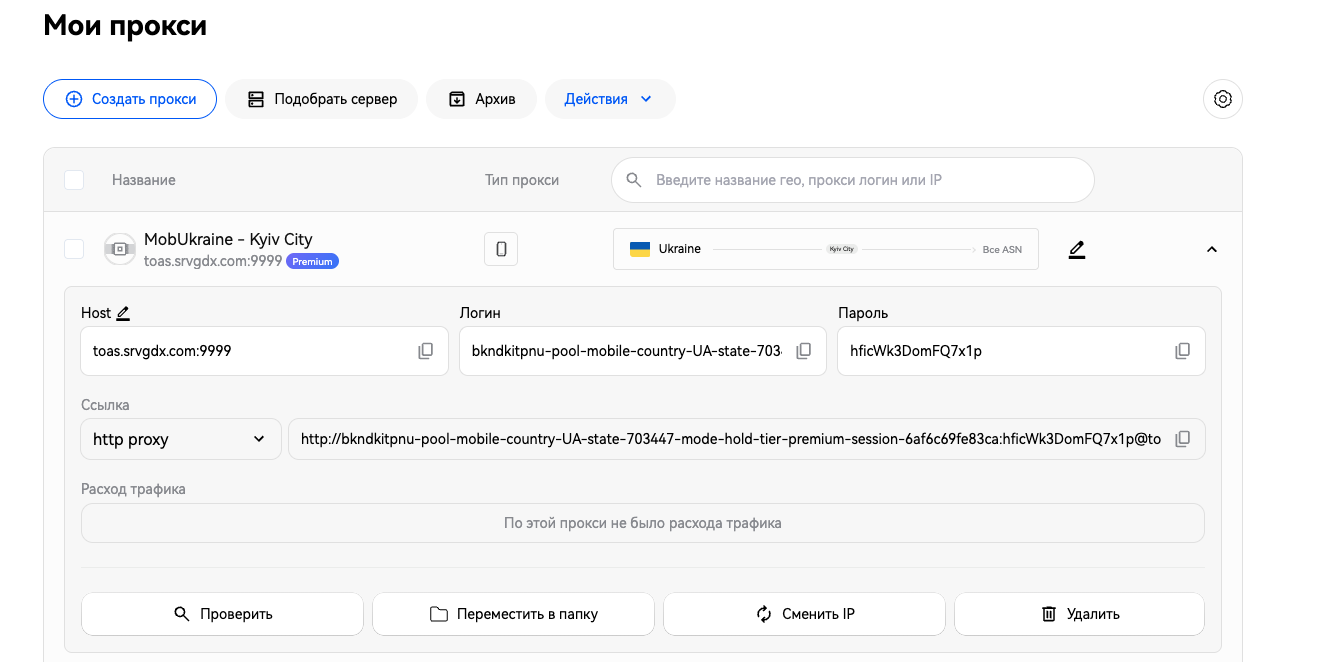
Once you click "Create Proxy," you get instant connection credentials (Host, Login, Password or a ready-to-paste HTTP/SOCKS5 string) along with a one-click port health check button.
4. Step-by-Step Checklist for a Safe First Login
With your proxy created and verified, you are ready to purchase and launch your account. To stay well within the 2-hour warranty window and avoid triggering anti-fraud flags, follow this exact sequence:
- Prep your antidetect profile first. Create a fresh browser profile, paste your SX.ORG proxy credentials and verify via a checker (like Whoer or Pixelscan) that your IP matches the target GEO and that your timezone and browser language align automatically.
- Grab the account and load the User-Agent. After paying in @shop_3kota_bot, download your account archive. Before doing anything else, copy the User-Agent string from the text file and paste it into your antidetect profile settings so the browser presents the exact same device footprint used during farming.
- Import Cookies. Load the cookies into your profile and navigate to FB. When everything aligns properly, you will land straight in an authenticated newsfeed without typing a login or password the safest possible entry method.
- Run a quick audit within the first 2 hours. Resist the urge to jump straight into Ads Manager and attach cards. Scroll the feed for 3–5 minutes, check Account Quality and verify that all promised Fan Pages, linked autoregs and BM spend limits are intact. If there is a genuine defect (missing assets or a pre-existing ban), you will catch it in time to request a replacement from support.
- Let the setup rest. After checking everything, leave the profile idle for a few hours (or until the next day) so Facebook's systems acclimatize to your new IP address before you launch campaigns.
A Helpful Bonus for Your Tests
If you are currently testing new funnels and need reliable assets to scale, check out the catalog at 3kota.shop or jump straight into their Telegram bot @shop_3kota_bot. At checkout, you can apply the promo code SXORG to get 10% off any order in the store.
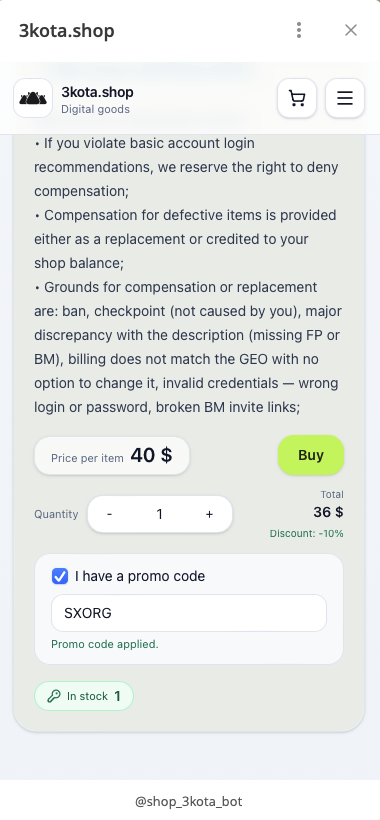
code SXORG takes 10% off your order inside the @shop_3kota_bot checkout*
Build your media buying infrastructure smartly: pairing properly farmed setups with clean mobile and residential proxies from SX.ORG pays for itself on your very first launch by eliminating wasted spend on preventable bans.